



Monitoring and Troubleshooting
SAS PCE authentication activity
Risk decisions based on a valid risk score are recorded in the SAS PCE authentication activity with the credential type RiskScore:
| Outcome | Result | Message |
|---|---|---|
| DENY | Authentication failure | Login denied for user <username> after Risk Score evaluation. |
| STEP_UP | Challenge | Step-up initiated for user <username> after Risk Score evaluation. |
ALLOW decisions are not recorded. The result of the additional authentication factor requested during step-up is recorded separately under that factor. Records are written only for users who exist in SAS PCE.
SafeNet Access Exchange events
A denied sign-in is recorded as a LOGIN_ERROR event in Events > User events, with the error access_denied. The event is attributed to the denied user.
To record events, enable Save events under Realm settings > Events. For more information, see Configuring auditing to track events.
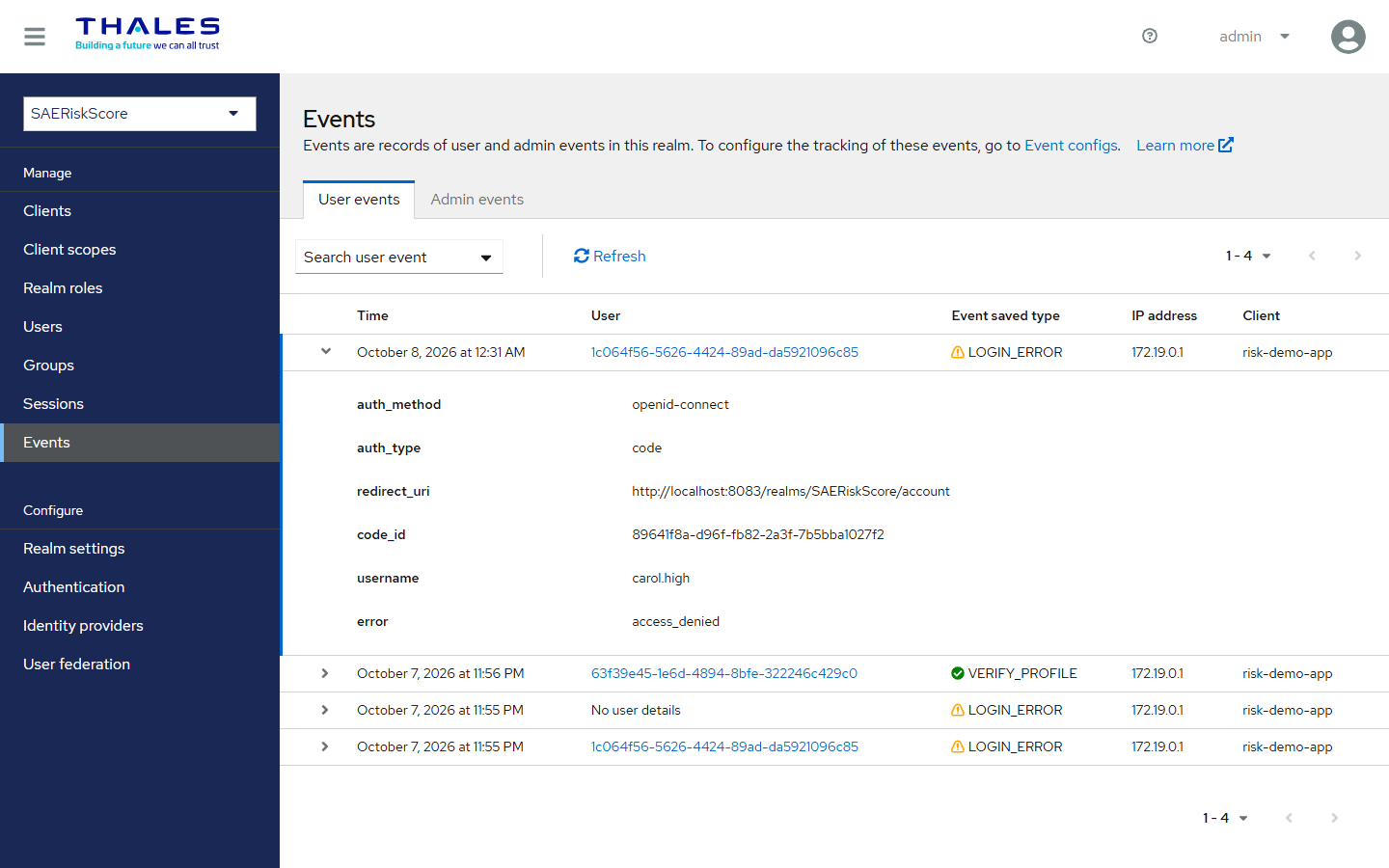
SafeNet Access Exchange logs
Denials and invalid configurations are written to the SafeNet Access Exchange log at the default log level. To trace every risk decision, enable the debug level for the risk score package. For example, add the following configuration to the docker-compose file:
KC_LOG_LEVEL=info,com.safenet.keycloak.agent.sasauthenticator.authenticator.riskscore:debug
Refer to Logging in SafeNet Access Exchange. Risk score values are never written to the log.
Behavior notes
-
When the risk score is evaluated: When the user signs in using the sign-in form of the SafeNet flow. With the RiskScore flow with SSO re-evaluation, the risk score is also evaluated each time the user accesses another application through an existing SSO session. A change in the risk score does not terminate existing sessions.
-
How fast a score change takes effect: SafeNet Access Exchange reads the score from the directory at every sign-in. A change takes effect as soon as it is written to the directory.
Troubleshooting
| Symptom | Cause and resolution |
|---|---|
| Every user signs in without a risk decision. | SafeNet Access Exchange cannot find the risk score. Verify that riskScore is displayed in the user's metadata (Users > Details > User metadata). Also, verify that Risk Score Attribute Name in the SAE Risk Score Evaluator is set to riskScore, not the default value saeRiskScore. |
| The risk score in SafeNet Access Exchange does not match the directory. | Verify that Always Read Value From LDAP is set to On in the LDAP mapper. If the directory value is incorrect, check the publishing process, for example, the SailPoint IdentityIQ provisioning policy. |
| A user with a risk score is unexpectedly denied access. | The directory value is not a valid whole number, for example, 450.5, or it is blank. The log contains attribute present but value unusable — DENY. Correct the value in the directory. |
Sign-in fails with Invalid username or password despite valid credentials, and the log contains Federated storage is not writable. |
The LDAP provider's Edit mode is set to READ_ONLY. Set it to UNSYNCED or WRITABLE under User federation > LDAP provider > Settings. |
| All sign-ins fail after enabling the SAE Risk Score Evaluator. | The SAE Risk Score Evaluator step at the bottom of a SafeNet authentication flow was set to Required in its delivered position. Delete this step and add the evaluator inside the Forms sub-flow, as described in Identity Provider (SafeNet Access Exchange) Setup. |
| Users with an SSO session are not re-evaluated when they access another application. | This is the expected behavior when the evaluator is inside the Forms sub-flow. To re-evaluate the risk score during SSO, use the RiskScore flow with SSO re-evaluation. |
| MEDIUM-band users are never stepped up. | Verify that the MEDIUM-band outcome is set to STEP_UP and that the Risk Step-Up sub-flow is Conditional. Ensure that it is placed after the SAE Risk Score Evaluator in the same sub-flow and contains Condition - SAE Risk Score Step-Up. Also, verify that the thresholds do not differ by only 1. |
| Step-up authentication fails or the user is prompted for a factor they cannot complete. | The step-up factor must be one that the user has not already completed in the flow and must be enrolled for the user. For more information, see Choosing the step-up factor. |
| The thresholds and outcomes are ignored. | The log contains Risk-score config is invalid — using default outcome. Open the SAE Risk Score Evaluator settings, correct the thresholds, and click Save. |
| SAE Risk Score Evaluator is not listed when adding a step. | The SafeNet Access Exchange version does not include the feature. Verify that sae-risk-score-evaluator and sae-risk-score-conditional are listed in Realm settings > Provider info. |
| No RiskScore records in the SAS PCE authentication activity. | Only DENY and STEP_UP decisions are recorded, and only for users who exist in SAS PCE. |
Setting the risk score manually
To test the configuration before connecting the IGA platform, set the attribute directly in the directory for the test users.
Active Directory (PowerShell):
Set-ADUser -Identity aaron.nichols -Replace @{codePage=450}
To remove the score from a user:
Set-ADUser -Identity aaron.nichols -Clear codePage
LDAP (LDIF):
dn: uid=aaron.nichols,ou=users,dc=example,dc=com
changetype: modify
replace: description
description: 450
Verifying the directory attribute
Before configuring SafeNet Access Exchange, verify that the attribute contains the expected value. For example, in Active Directory:
Get-ADUser -Identity aaron.nichols -Properties codePage | Select-Object SamAccountName, codePage
Prepare at least one test user for each risk band. Use the following values with the default thresholds:
| Test user | Directory attribute | Expected band |
|---|---|---|
| User 1 | 100 |
LOW |
| User 2 | 500 |
MEDIUM |
| User 3 | 900 |
HIGH |
| User 4 | Not set | No score |

