



Risk Score-Based Authentication Flows
SafeNet Access Exchange (SAE) can adapt the sign-in experience based on a risk score stored in each user's LDAP or Active Directory. Users with a low score sign in through the normal SafeNet authentication flow, users with a medium score must complete an additional authentication factor, and users with a high score are denied access.
SAE does not calculate the risk score. An Identity Governance and Administration (IGA) platform, such as SailPoint IdentityIQ, calculates it and writes it to an attribute in the directory. The directory synchronizes the user to SAE through LDAP User Federation, and an LDAP mapper copies the score into an SAE user attribute. The SAE Risk Score Evaluator step in the authentication flow then reads that attribute at every sign-in.
This documentation describes how to configure risk score-based authentication in SafeNet Access Exchange for users federated from LDAP or Active Directory.
The integration comprises the following components:
-
IGA platform (for example, SailPoint IdentityIQ): Calculates the risk score of each user and publishes it to an attribute in the directory.
-
LDAP / Active Directory: Stores the risk score of each user in a directory attribute and synchronizes users to SafeNet Access Exchange.
-
SafeNet Access Exchange (SAE): Reads the risk score through LDAP User Federation, evaluates it in the authentication flow, and allows, steps up, or denies the sign-in.
-
SAS PCE: Provides the multi-factor authentication (OTP or FIDO) used by the SafeNet authentication flows, including step-up authentication.
Authentication Flow
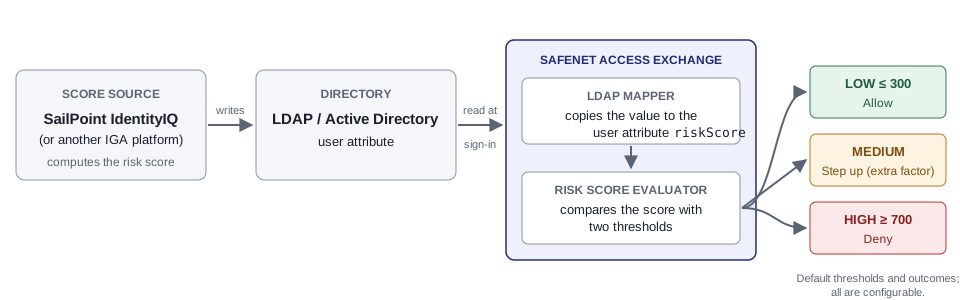
The image below illustrates how the risk score is passed to SafeNet Access Exchange and used during authentication.
-
The IGA platform calculates the risk score of the user and writes it to an attribute on the user's account in the directory, for example,
codePage. -
The user accesses an application integrated with SafeNet Access Exchange and is redirected to SafeNet Access Exchange for authentication.
-
SafeNet Access Exchange identifies the user through the SafeNet authentication flow. The LDAP mapper reads the directory attribute and copies the value to the
riskScoreuser attribute. -
The SAE Risk Score Evaluator assigns the score to a risk band and applies the outcome configured for that band:
Risk band Score Default outcome What the user experiences LOW At or below the LOW-band Upper Threshold (default 300)ALLOW Completes the normal SafeNet authentication flow. MEDIUM Between the two thresholds STEP_UP Must complete an additional authentication factor not already used in the flow, such as FIDO after LDAP + OTP. HIGH At or above the HIGH-band Lower Threshold (default 700)DENY Is denied access. No score The directory attribute is not set — Completes the normal SafeNet authentication flow. -
If access is allowed, SafeNet Access Exchange redirects the user back to the application.
Integration - Risk Score-Based Authentication Flows
Before configuring risk score-based authentication, complete the required prerequisites.
Configuring risk score-based authentication is a three-step process:
-
LDAP Directory Setup: Publish the risk score to a directory attribute.
-
Identity Provider (SafeNet Access Exchange) Setup: Map the directory attribute to an SAE user attribute, add the SAE Risk Score Evaluator and a Risk Step-Up sub-flow to your SafeNet authentication flow, and configure the thresholds.
-
Verify Authentication: Test each risk band.
For information about audit records, logs, and common issues, see Monitoring and Troubleshooting.

