



Policy
Note
Before configuring the STA policy, please read the Security Considerations.
Perform following steps to configure the STA policy for the Password Self-Service application:
-
Log in to the STA console as an operator.
-
Before proceeding to the next step, verify that the appropriate realm/organization is selected.
-
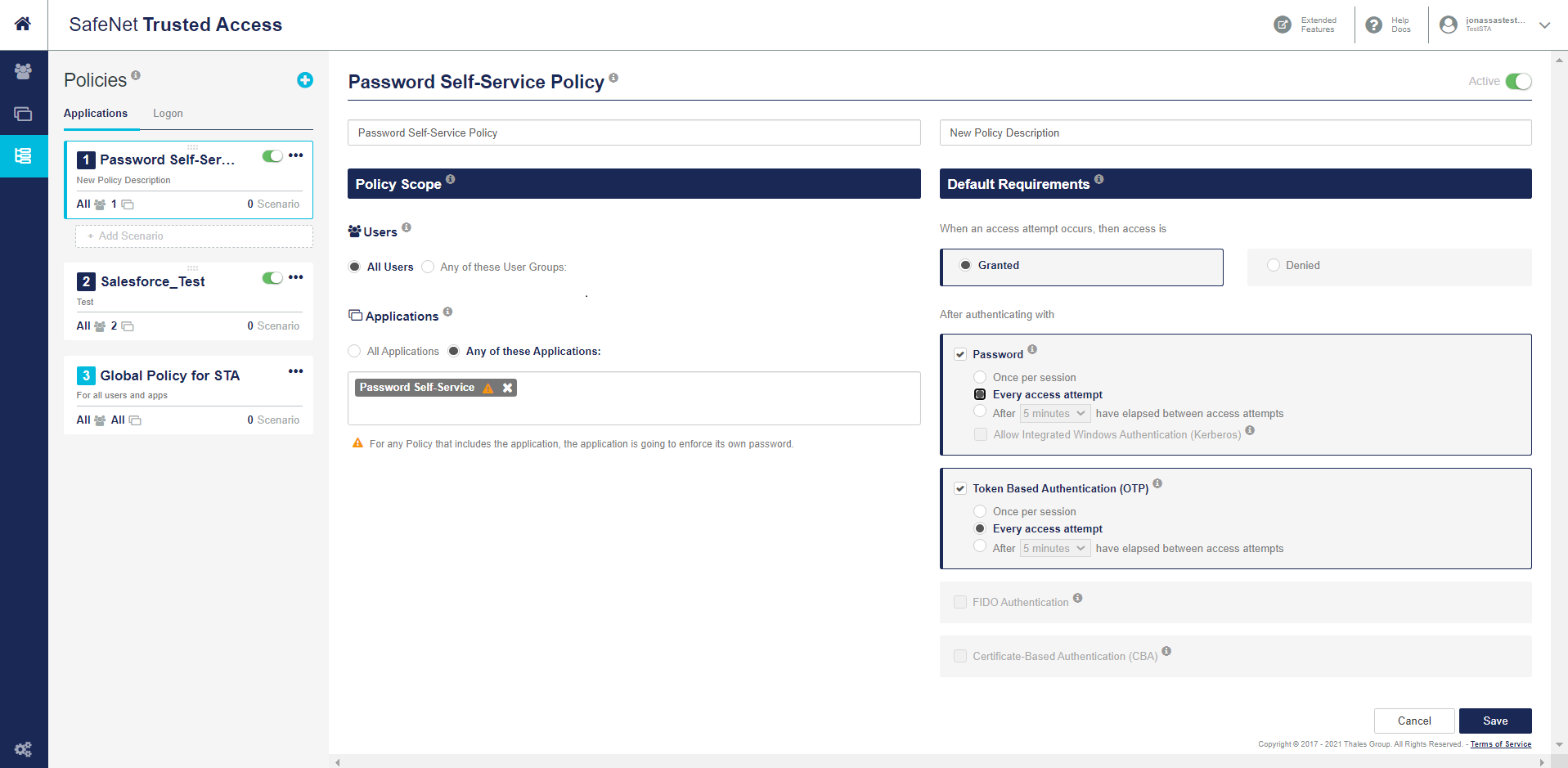
Under Create Policy, perform the following steps to create a policy:
a. Enter a name for the policy (for example, PasswordSelf-ServicePolicy).
b. Enter a description of the policy.
c. Under Policy Scope, under Users, select All Users.
d. Under Applications, select Any of these Applications, and in the text field, enter the application name (for example, PasswordSelf-Service).
e. Under Default Requirements, select Granted for access attempts.
f. Under After authenticating with,
-
Under Password, select Every access attempt.
-
Under Token Based Authentication (OTP), select Every access attempt.
If both Password and OTP are selected, the authentication preference is given to Token Based Authentication (OTP). Password only authentication is not recommended.
g. Click Save.
To avoid any conflicts, the Password Self-Service application should not be a part of any other policy.
-

