



Permissions
This section describes the required permissions and configuration settings for iOS and Android signal collection.
Risk Management SDK permissions
The following table provides the permissions required for signals under each signal group. If the necessary permissions are not provided, there is no signal collection in the Risk Management SDK. Hence, the signal is not considered for risk assessment at the Risk Engine back end.
Permission required for each signal
| Signal group | Signal | Permissions required |
|---|---|---|
| Device | fingerprint | On Android: NO_PERMISSIONOn devices with Android O and below, if android.permission.READ_PHONE_STATE is enabled, the device serial number is included to calculate the fingerprint value. On iOS: NO_PERMISSION |
| Device | manufacturer | NO_PERMISSION |
| Device | model | NO_PERMISSION |
| Device | imei | On Android: android.permission.READ_PHONE_STATE On iOS: Feature is not supported |
| Device | androidId | NO_PERMISSION |
| Device | screenHeight | NO_PERMISSION |
| Device | screenWidth | NO_PERMISSION |
| Device | batteryLevel | NO_PERMISSION |
| Device | processor | NO_PERMISSION On iOS: Feature is not supported |
| Device | totalMemory | NO_PERMISSION |
| Location | location | On Android: android.permission.ACCESS_FINE_LOCATION android.permission.ACCESS_COARSE_LOCATION On iOS: NSLocationWhenInUseUsageDescription NSLocationAlwaysUsageDescription |
| Location | countryCode | On Android: android.permission.ACCESS_FINE_LOCATION android.permission.ACCESS_COARSE_LOCATION On iOS: NSLocationWhenInUseUsageDescription NSLocationAlwaysUsageDescription |
| Location | countryName | On Android: android.permission.ACCESS_FINE_LOCATION android.permission.ACCESS_COARSE_LOCATION On iOS: NSLocationWhenInUseUsageDescription NSLocationAlwaysUsageDescription |
| Network | carrierName | On Android: NO_PERMISSION On iOS: NO_PERMISSION |
| Network | type | On Android: android.permission.ACCESS_NETWORK_STATE On iOS: NO_PERMISSION |
| Network | hwAddress | On Android: If Android version 6.0 or greater android.permission.ACCESS_WIFI_STATE android.permission.INTERNET If the Android version is less than 6.0 android.permission.ACCESS_FINE_LOCATION android.permission.ACCESS_COARSE_LOCATION android.permission.CHANGE_WIFI_STATE On iOS: NSLocationWhenInUseUsageDescription NSLocationAlwaysUsageDescription |
| Network | ipAddress | On Android: android.permission.ACCESS_NETWORK_STATE android.permission.INTERNET On iOS: NO_PERMISSION |
| Network Settings | security | On Android: android.permission. CHANGE_WIFI_STATE android.permission.ACCESS_FINE_LOCATION android.permission.ACCESS_COARSE_LOCATION On iOS: Feature is not supported |
| Network Settings | name | On Android: android.permission.ACCESS_NETWORK_STATE android.permission.ACCESS_WIFI_STATE android.permission.BLUETOOTH android.permission.CHANGE_WIFI_STATE android.permission.ACCESS_FINE_LOCATION android.permission.ACCESS_COARSE_LOCATION On iOS: NSLocationWhenInUseUsageDescription NSLocationAlwaysUsageDescription |
| Platform | family | NO_PERMISSION |
| Platform | type | NO_PERMISSION |
| Platform | Version | NO_PERMISSION |
| Platform | patchVersion | NO_PERMISSION |
| Platform | isRooted | NO_PERMISSION |
| Platform Settings | timezone | NO_PERMISSION |
| Platform Settings | locale | NO_PERMISSION |
| Platform Settings | isWifiEnabled | On Android android.permission.ACCESS_WIFI_STATE On iOS: NO_PERMISSION |
| Platform Settings | isBluetoothEnabled | On Android: android.permission.BLUETOOTH On iOS: Not supported |
| Platform Settings | isLocationEnabled | On Android: android.permission.ACCESS_FINE_LOCATION android.permission.ACCESS_COARSE_LOCATION On iOS: NO_PERMISSION |
| Platform Settings | deviceLock | NO_PERMISSION |
| Platform Settings | isUntrustedAppAllowed | On Android: If Android version 8.0 or greater android.permission.REQUEST_INSTALL_PACKAGES If Android version less than 8.0 NO_PERMISSION On iOS: NO_PERMISSION |
| App | name | NO_PERMISSION |
| App | id | NO_PERMISSION |
| App | version | NO_PERMISSION |
| App | locale | NO_PERMISSION |
| App | isRegisteredForRemoteNotifications | NO_PERMISSION |
| App | installTime | NO_PERMISSION |
| App | lastUpdateTime | NO_PERMISSION |
| App | instanceId | NO_PERMISSION |
| App | fingerprint | NO_PERMISSION |
| SIM | iccid | On Android: android.permission.READ_PHONE_STATE On iOS: Not supported |
| SIM | imsi | On Android: android.permission.READ_PHONE_STATE On iOS: Not supported |
| SDK | version | NO_PERMISSION |
| SDK | name | NO_PERMISSION |
| Browser | userAgent | NO_PERMISSION |
| BehavioSec | timing | On Android: android.permission.READ_PHONE_STATE android.permission.READ_PHONE_NUMBERS (apps targeting API level >= 30) On iOS: Privacy - Location When In Use Usage Description |
Permissions required for ThreatMetrix
The following table provides the permissions required for ThreatMetrix profiling.
| Signal group | Signal | Permissions required |
|---|---|---|
| ThreatMetrix | sessionId | On Android: android.permission.INTERNET The following permissions are optional:
On iOS: NO_PERMISSION The following permissions are optional:
|
iOS certificate pinning for release configuration
You can configure the Risk Management SDK back end and application server URLs in the ATS configuration of Info.plist.
The Risk Management SDK established its HTTPS connection over TLS with the Risk Engine back end to get the visitID. To protect from man-in-the-middle attacks, it rejects hostname-mismatch and self-signed certificates, and accepts only root CA trusted certificates. In addition, the Risk Management SDK also uses strong cipher suites.
ATS is part of the application's configuration, so the following settings need to be added to the application's plist file via Key > App Transport Security Settings.
-
In the application’s
Info.plistfile, add a dictionary with App Transport Security Settings.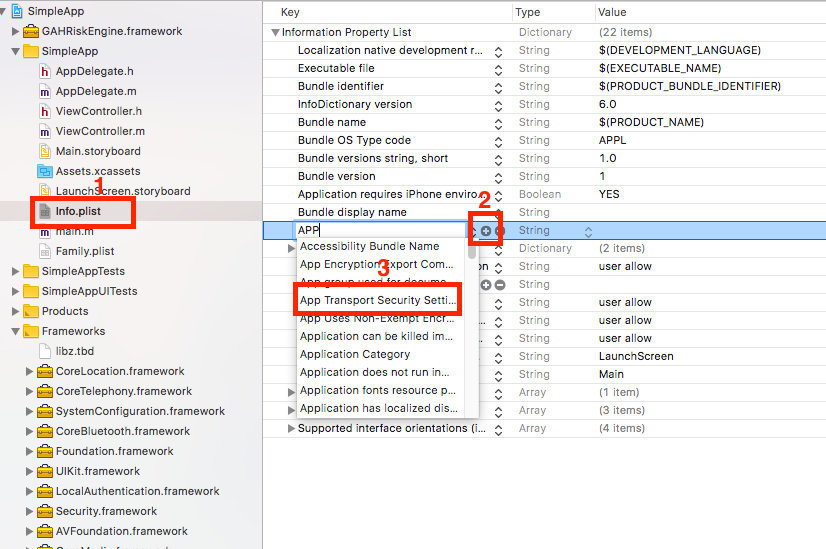
-
In the Application Transport Security Settings (ATS), configure the parameters for Exception Domains based on the GAH back-end URL.

Recommendations for the host application
-
NSAllowArbitaryLoads key is set to
NOby default. Setting the key toYESindicates that it will be opted out of ATS and from its associated security benefits. -
NSExceptionDomains dictionary sets name specific domains for which exceptions need to be set. Currently no exceptions are required, adding domain names is required only for certificate pinning.

