



Ionic mobile integration
This guide provides step-by-step instructions for building a custom Cordova plugin wrapper for the Risk Management SDK (GAHRiskEngine 3.1.0 and ThreatMetrix 7.6.36) and integrating it into a hybrid Ionic application. You can start with an empty folder, create and configure the plugin, integrate it with the Ionic app, and use it to invoke the SDK.
Caution
This guide is applicable for Cordova-based Ionic applications, where plugins are defined using plugin.xml and native plugin classes extend CordovaPlugin/CDVPlugin.
Recent Ionic CLI projects may use Capacitor by default, which follows a different plugin architecture. Before proceeding, check your project for a capacitor.config.ts file. If this file exists, the plugin development steps in this guide do not apply as written.
Cross-platform frameworks
This section describes how to integrate the Risk Management SDK using cross-platform frameworks.
Cordova
Cordova is an open-source framework for building mobile applications using HTML5, CSS3, and JavaScript. A single code base targets multiple platforms (Android and iOS).
It provides access to native device features from JavaScript through Cordova plugins (Camera, NFC, Bluetooth, GPS, and so on), and is typically used in combination with a UI framework.
Ionic
Ionic is built on top of Cordova. It is a front-end, mobile-optimized library and UI framework that gives a Cordova app a native look and feel.
Ionic apps are created and developed primarily through the Ionic command line utility (CLI), and use Cordova to build and deploy as a native app. Several utilities must therefore be installed before development can start.
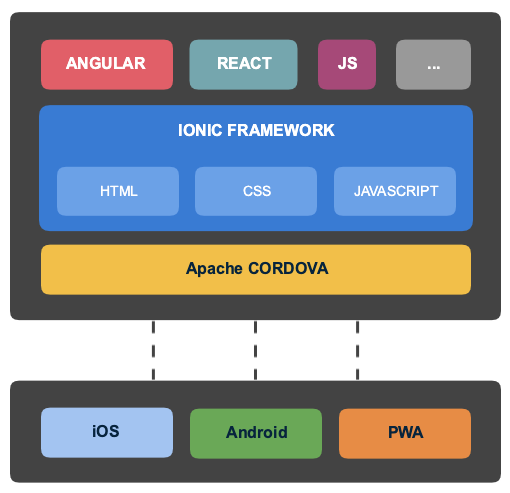
Set up the development environment
To build and package the custom plugin wrapper and run the Ionic example application, ensure that your development environment has the following tools and dependencies installed:
- Node.js: Version
18.xor20.x(LTS) - Ionic CLI: Install globally by using npm:
bash npm install -g @ionic/cli - Cordova CLI: Install globally by using npm:
bash npm install -g cordova - Android development environment (required to compile the Android native part):
- Android Studio: Hedgehog or newer
- Java Development Kit (JDK): JDK 17 — the
JAVA_HOMEenvironment variable must point to this installation. If the latest version is used, update the gradle version accordingly. - Android SDK Platforms: API Level 28 through 34
- iOS development environment (macOS only, required to compile the iOS native part):
- Xcode: Version 15.x or newer
- CocoaPods: Install by using Homebrew or RubyGems:
bash
    brew install cocoapods
- Risk Management SDK: 3.1.0 — the native artifacts (
GAHRiskEngine.jar/.aarfiles for Android,.xcframeworkbundles for iOS) are not publicly downloadable and must be obtained from a Thales/OneWelcome representative before starting the Add Risk Management SDK steps below.
Create the Cordova plugin
This section provides instructions for creating the native Android or iOS part of the Cordova plugin:
A Cordova plugin is a piece of add-on code that provides a JavaScript interface to native components. It lets an application use native device capabilities beyond what is available to pure web apps. See the existing Cordova plugins.
To use the Risk Management SDK in an Ionic project, you must create a Cordova plugin that wraps the SDK.
To generate a clean, isolated Cordova plugin wrapper from scratch, use the Cordova plugman command-line utility or construct the directory tree manually. To use plugman, run the following commands in a terminal:
npm install -g plugman
plugman create --name GahPlugin --plugin_id com.gemalto.plugin.gah --plugin_version 0.0.1
Note
The plugman create command generates placeholder versions of package.json, plugin.xml, and www/GahPlugin.js. This guide provides complete versions of these files below. If you have already run the command, replace the generated files with the versions provided in this guide rather than maintaining both sets of files.
Create the file structure
To create a Cordova plugin, set up the following file structure in any location on the file system:
gah-plugin/
├── plugin.xml                          <-- Master plugin manifest
├── package.json                        <-- NPM registry file
├── www/
│   └── GahPlugin.js                    <-- JavaScript bridge interface
└── src/
    ├── android/
    │   ├── GahPlugin.java              <-- Android Cordova Controller
    │   ├── GAHRiskEngineIntegration.java   <-- Java wrapper implementation
    │   ├── gahBuild.gradle              <-- Custom Android build configuration
    │   └── libs/
    │       ├── debug/
    │       │   ├── GAHRiskEngine.jar
    │       │   └── <arch>/libmedlc_shared.so, libTMXProfiling-7.6-36-jni.so
    │       ├── release/
    │       │   ├── GAHRiskEngine.jar
    │       │   └── <arch>/libmedlc_shared.so, libTMXProfiling-7.6-36-jni.so
    │       └── 3pty/
    │           ├── TMXProfiling-7.6-36.jar
    │           ├── TMXProfilingConnections-7.6-36.aar
    │           └── TMXBehavioSec-7.6-36.aar
    └── ios/
        ├── GahPlugin.h                  <-- iOS Cordova header
        ├── GahPlugin.m                  <-- iOS Cordova controller
        ├── GAHRiskEngineIntegration.h   <-- iOS integration header
        ├── GAHRiskEngineIntegration.m   <-- iOS integration implementation
        ├── GAHRiskEngine.xcframework
        ├── TMXProfiling.xcframework
        ├── TMXBehavioSec.xcframework
        └── TMXProfilingConnections.xcframework
plugin.xmlis the main configuration file for the plugin.package.jsonis a Node.js project description and dependencies.srcis the source code directory for the native Android and iOS platforms.wwwis the javascript API directory.
Create the plugin summary
Edit the package.json file with the plugin summary.
{
    "name": "gahplugin",
    "version": "0.0.1",
    "cordova_name": "GahPlugin",
    "description": "GAH Risk Management Cordova wrapper plugin",
    "license": "UNLICENSED",
    "cordova": {
        "id": "com.gemalto.plugin.gah",
        "platforms": [
            "android",
            "ios"
        ]
    },
    "author": {
        "name": "Author",
        "email": "author@email.com"
    },
    "keywords": [
        "ecosystem:cordova",
        "cordova-android",
        "cordova-ios",
        "gah",
        "threatmetrix"
    ],
    "engines": {
        "cordovaDependencies": {
            "cordova": ">=10.0.0"
        }
    }
}
Create the JavaScript API
The JavaScript interface exposes clean, callback-compatible methods to the Ionic layer. Save the following content as www/GahPlugin.js, adding an entry for every API the application needs to expose:
var exec = require('cordova/exec');
var PLUGIN_NAME = 'GahPlugin';

/**
 * JavaScript-facing API for the GAH Risk Management Cordova plugin.
 * Each method proxies to the native Android/iOS implementation via
 * Cordova's `exec` bridge.
 * @constructor
 */
function GahPlugin() {}

/**
 * Initializes the native GAH SDK.
 * @param {Object} options - Initialization options.
 * @param {string} options.gahUrl - The GAH signal collector URL.
 * @param {string} options.tmxOrgId - The ThreatMetrix organization ID.
 * @param {string} options.tmxFpServerUrl - The ThreatMetrix fingerprint server URL.
 * @param {function} successCallback - Called when initialization succeeds.
 * @param {function} errorCallback - Called with an error message on failure.
 * @returns {void}
 */
GahPlugin.prototype.initialize = function (options, successCallback, errorCallback) {
    if (!options || typeof options !== "object") {
        if(errorCallback) errorCallback("Options object is required for initialization.");
        return;
    }
    exec(successCallback, errorCallback, PLUGIN_NAME, "initialize", [options]);
};

/**
 * Starts background collection of device signals.
 * @param {function} successCallback - Called once prefetch has started.
 * @param {function} errorCallback - Called with an error message on failure.
 * @returns {void}
 */
GahPlugin.prototype.startPrefetch = function (successCallback, errorCallback) {
    exec(successCallback, errorCallback, PLUGIN_NAME,'startPrefetch', []);
};

/**
 * Stops background collection of device signals.
 * @param {function} successCallback - Called once prefetch has stopped.
 * @param {function} errorCallback - Called with an error message on failure.
 * @returns {void}
 */
GahPlugin.prototype.stopPrefetch = function (successCallback, errorCallback) {
    exec(successCallback, errorCallback, PLUGIN_NAME,'stopPrefetch', []);
};

/**
 * Checks whether background signal collection has completed.
 * @param {function} successCallback - Called with a boolean completion status.
 * @param {function} errorCallback - Called with an error message on failure.
 * @returns {void}
 */
GahPlugin.prototype.isSignalCollectionCompleted = function (successCallback, errorCallback) {
    exec(successCallback, errorCallback, PLUGIN_NAME,'isSignalCollectionCompleted', []);
};

/**
 * Retrieves the current session Visit ID.
 * @param {function} successCallback - Called with the Visit ID string.
 * @param {function} errorCallback - Called with an error message on failure.
 * @returns {void}
 */
GahPlugin.prototype.getVisitId = function (successCallback, errorCallback) {
    exec(successCallback, errorCallback, PLUGIN_NAME,'visitId', []);
};

/**
 * Flags the current transaction as critical for risk scoring purposes.
 * @param {function} successCallback - Called once the flag is set.
 * @param {function} errorCallback - Called with an error message on failure.
 * @returns {void}
 */
GahPlugin.prototype.setTransactionAsCritical = function (successCallback, errorCallback) {
    exec(successCallback, errorCallback, PLUGIN_NAME,'setTransactionAsCritical', []);
};

var gahPlugin = new GahPlugin();
module.exports = gahPlugin;
Create the plugin.xml skeleton
Create plugin.xml at the root of the plugin with the shared <plugin> element and the <js-module> entry that exposes www/GahPlugin.js as the global GahPlugin object used throughout this guide:
<?xml version="1.0" encoding="UTF-8"?>
<plugin xmlns="http://apache.org/cordova/ns/plugins/1.0"
        id="com.gemalto.plugin.gah"
        version="0.0.1">

    <name>GahPlugin</name>
    <description>GAH Risk Management Cordova plugin</description>
    <license>Proprietary — Copyright (c) THALES DEVELOPMENT</license>

    <js-module src="www/GahPlugin.js" name="GahPlugin">
        <clobbers target="GahPlugin" />
    </js-module>

    <!-- The Android and iOS <platform> blocks from the following sections go here -->

</plugin>
Each platform-specific <platform> block shown in the Android and iOS tabs below must be added inside this <plugin> root element, not as a standalone file.
Create the native Java controllers inside the plugin workspace to intercept the Cordova bridge and coordinate initialization parameters. All the files for the Android native part need to be placed in the src/android folder. The Android native part consists of the following files:
- Java source code
- Risk Management SDK (JAR file and native libraries)
- gradle build file
Java source code
The Java source code needed in the plugin is divided into two classes:
src/android/GahPlugin.javaisCordova Controller Interfaceand map the Javascript calls to background threads.
```java
    package com.gemalto.plugin.gah;

    import org.apache.cordova.CordovaPlugin;
    import org.apache.cordova.CallbackContext;
    import org.json.JSONArray;
    import org.json.JSONException;
    import org.json.JSONObject;

    import android.content.Context;

    /**
     * Cordova Controller Interface for the GAH Risk Management plugin.
     * <p>
     * Maps JavaScript {@code exec} calls coming from the Ionic/Cordova layer
     * to the native {@link GAHRiskEngineIntegration} adapter, running each
     * action on the Cordova background thread pool where required.
     */
    public class GahPlugin extends CordovaPlugin {
        private GAHRiskEngineIntegration integration;

        /**
         * Called once by the Cordova runtime when the plugin instance is created.
         * Initializes the native {@link GAHRiskEngineIntegration} adapter using the
         * application {@link Context}.
         */
        @Override
        protected void pluginInitialize() {
            super.pluginInitialize();
            Context context = this.cordova.getActivity().getApplicationContext();
            integration = new GAHRiskEngineIntegration(context);
        }

        /**
         * Dispatches a JavaScript {@code exec} action to the matching native method.
         *
         * @param action          the action name requested from JavaScript
         * @param args            arguments passed from JavaScript for the action
         * @param callbackContext used to return the result (or error) back to JavaScript
         * @return {@code true} if the action was recognized and handled, {@code false} otherwise
         * @throws JSONException if the arguments cannot be parsed as JSON
         */
        @Override
        public boolean execute(String action, JSONArray args, final CallbackContext callbackContext) throws JSONException {
            if ("initialize".equals(action)) {
                JSONObject options = args.optJSONObject(0);
                if (options == null) {
                    callbackContext.error("Initialization options cannot be null.");
                    return true;
                }
                String gahUrl = options.optString("gahUrl", "");
                String tmxOrgId = options.optString("tmxOrgId", "");
                String tmxFpServerUrl = options.optString("tmxFpServerUrl", "");

                cordova.getThreadPool().execute(() -> {
                    if (integration.initializeGAH(gahUrl, tmxOrgId, tmxFpServerUrl)) {
                        callbackContext.success("Initialized Successfully");
                    } else {
                        callbackContext.error("GAH SDK initialization failed. Check the logcat output tagged GAHSDK for details.");
                    }
                });
                return true;
            } else if ("startPrefetch".equals(action)) {
                cordova.getThreadPool().execute(() -> {
                    integration.startPrefetchCollection();
                    callbackContext.success("Prefetch started");
                });
                return true;
            } else if ("stopPrefetch".equals(action)) {
                cordova.getThreadPool().execute(() -> {
                    integration.stopPrefetchCollection();
                    callbackContext.success("Prefetch stopped");
                });
                return true;
            } else if ("isSignalCollectionCompleted".equals(action)) {
                integration.isSignalCollectionCompleted(callbackContext);
                return true;
            } else if ("visitId".equals(action)) {
                integration.requestVisitId(callbackContext);
                return true;
            } else if ("setTransactionAsCritical".equals(action)) {
                cordova.getThreadPool().execute(() -> {
                    integration.setTransactionAsCritical();
                    callbackContext.success("Transaction set as critical");
                });
                return true;
            }

            return false;
        }
    }
```
src/android/GAHRiskEngineIntegration.javais Thales Android Service Adapter. This wrapper implements the asynchronous GAHCore APIs (requestVisitIDandinitialize) using the required SDK callback protocols.
```java
    package com.gemalto.plugin.gah;

    import android.app.Application;
    import android.content.Context;
    import android.util.Log;

    import org.apache.cordova.CallbackContext;
    import org.apache.cordova.PluginResult;

    import com.gemalto.riskengine.GAHCore;
    import com.gemalto.riskengine.GAHCoreConfig;
    import com.gemalto.riskengine.GAHGemaltoSignalConfig;
    import com.gemalto.riskengine.GAHTMXConfig;
    import com.gemalto.riskengine.GAHResponseCallback;
    import com.gemalto.riskengine.GAHPrefetchStatusCallback;

    /**
     * Thales Android Service Adapter.
     * <p>
     * Wraps the asynchronous GAHCore SDK APIs ({@code requestVisitID}, {@code initialize},
     * prefetch, and signal retrieval) behind a small set of plain Java methods that
     * {@link GahPlugin} can call from the Cordova bridge.
     */
    public class GAHRiskEngineIntegration {

    private static final String TAG = "GAHSDK";
    private final Context appContext;
    private boolean initialized;

    /**
     * Creates the adapter.
     *
     * @param context the Android context used to resolve the owning {@link Application}
     */
    public GAHRiskEngineIntegration(Context context) {
        this.appContext = context;
        this.initialized = false;
    }

    /**
     * Builds the GAH core, signal, and ThreatMetrix configurations and performs
     * SDK initialization. Safe to call only once; subsequent calls are ignored
     * by the underlying SDK once {@link #initialized} is set.
     *
     * @param gahUrl          the GAH signal collector URL
     * @param tmxOrgId        the ThreatMetrix organization ID
     * @param tmxFpServerUrl  the ThreatMetrix fingerprint server URL
     * @return {@code true} if initialization succeeded, {@code false} otherwise
     */
    public boolean initializeGAH(String gahUrl, String tmxOrgId, String tmxFpServerUrl) {
        try {
            Application app = (Application) appContext.getApplicationContext();

            // 1. Construct Core GAH Configuration
            GAHCoreConfig.Builder coreBuilder = new GAHCoreConfig.Builder(app, gahUrl);
            GAHCoreConfig coreConfig = coreBuilder.build();

            // 2. Construct Signal Configuration
            GAHGemaltoSignalConfig signalConfig = new GAHGemaltoSignalConfig.Builder().build();

            // 3. Construct ThreatMetrix Configuration
            GAHTMXConfig.Builder tmxBuilder = new GAHTMXConfig.Builder(tmxOrgId, tmxFpServerUrl);
            GAHTMXConfig tmxConfig = tmxBuilder.build();

            // 4. Perform SDK initialization
            GAHCore.initialize(coreConfig, signalConfig, tmxConfig);
            this.initialized = true;
            Log.d(TAG, "GAHCore successfully initialized on Android");
            return true;
        } catch (Exception e) {
            Log.e(TAG, "Initialization failed: " + e.getMessage(), e);
            return false;
        }
    }

    /**
     * Starts background collection of device signals. No-op if the SDK
     * has not been initialized yet.
     */
    public void startPrefetchCollection() {
        if (initialized) {
            GAHCore.startPrefetchSignals();
            Log.d(TAG,"startPrefetchSignals called.");
        }
    }

    /**
     * Stops background collection of device signals. No-op if the SDK
     * has not been initialized yet.
     */
    public void stopPrefetchCollection() {
        if (initialized) {
            GAHCore.stopPrefetchSignals();
            Log.d(TAG,"stopPrefetchSignals called.");
        }
    }

    /**
     * Asynchronously requests the current Visit ID from GAHCore and
     * forwards the result (or error) to the given callback.
     *
     * @param callbackContext receives the Visit ID on success, or an error otherwise
     */
    public void requestVisitId(final CallbackContext callbackContext) {
        if (!initialized) {
            callbackContext.error("SDK is not initialized");
            return;
        }

        // Asynchronous retrieval of the Visit ID
        GAHCore.requestVisitID(new GAHResponseCallback() {

            @Override
            public void success(String visitID) {
                callbackContext.success(visitID);
            }

            @Override
            public void error(int errCode, String errMessage) {
                callbackContext.error("Error [" + errCode + "]: " + errMessage);
            }
        });
    }

    /**
     * Asynchronously queries whether background signal prefetch has completed.
     *
     * @param callbackContext receives {@code true}/{@code false} depending on
     *                        the prefetch status, or an error if the SDK is
     *                        not initialized
     */
    public void isSignalCollectionCompleted(final CallbackContext callbackContext) {
        if (!initialized) {
            callbackContext.error("SDK is not initialized");
            return;
        }

        // Asynchronous query of prefetch collection status
        GAHCore.requestPrefetchStatus(new GAHPrefetchStatusCallback() {
            @Override
            public void onPrefetchCompleted(int statusCode, String statusMessage) {
                // Status code 0 = Success, 2 = Completed with Warnings
                boolean completed = (statusCode == 0 || statusCode == 2);
                // Return a real boolean so the JavaScript callback receives the
                // same type on Android and iOS.
                callbackContext.sendPluginResult(new PluginResult(PluginResult.Status.OK, completed));
            }
        });
    }

    /**
     * Flags the current transaction as critical, which the SDK uses to
     * prioritize risk scoring. No-op if the SDK has not been initialized yet.
     */
    public void setTransactionAsCritical() {
        if (initialized) {
            GAHCore.setTransactionAsCritical();
            Log.d(TAG,"setTransactionAsCritical called.");
        }
    }

}
```
Add Risk Management SDK
To compile the Android native modules, place the vendor-supplied Thales libraries into the following designated targets:
- Copy
GAHRiskEngine.jarto:src/android/libs/debug/GAHRiskEngine.jarandsrc/android/libs/release/GAHRiskEngine.jar - Copy
TMXProfiling-7.6-36.jarto:src/android/libs/3pty/TMXProfiling-7.6-36.jar - Copy
TMXProfilingConnections-7.6-36.aarto:src/android/libs/3pty/TMXProfilingConnections-7.6-36.aar - Copy
TMXBehavioSec-7.6-36.aarto:src/android/libs/3pty/TMXBehavioSec-7.6-36.aar - Copy the JNI JNA shared object
libmedlc_shared.soand the C++ profiling JNIlibTMXProfiling-7.6-36-jni.soslices to the corresponding arch folders underdebug/andrelease/:src/android/libs/debug/arm64-v8a/libmedlc_shared.sosrc/android/libs/debug/arm64-v8a/libTMXProfiling-7.6-36-jni.sosrc/android/libs/release/arm64-v8a/libmedlc_shared.sosrc/android/libs/release/arm64-v8a/libTMXProfiling-7.6-36-jni.so- (Repeat for armeabi-v7a, x86, and x86_64 architectures)
Create the Gradle file
Create the gradle file, which is then merged into the main build.gradle file of the generated Android Studio project.
src/android/gahBuild.gradle
```groovy
android {
    defaultConfig {
        ndk {
            abiFilters "armeabi-v7a", "arm64-v8a", "x86", "x86_64"
        }
    }
    compileOptions {
        sourceCompatibility JavaVersion.VERSION_1_8
        targetCompatibility JavaVersion.VERSION_1_8
    }
}

repositories {
    google()
    mavenCentral()
    flatDir {
        dirs 'src/main/libs', 'libs'
    }
}
dependencies {
    // Thales SDK — the resource-file entries in plugin.xml place the jar/aar
    // under src/main/libs/debug, src/main/libs/release, and src/main/libs/3pty
    // (not a flat src/main/libs/ or libs/), so each build type must reference
    // its own subfolder directly. Using a single `implementation fileTree(dir:
    // 'libs', ...)` here resolves against the empty module-level `libs/`
    // directory and silently contributes nothing to the classpath.
    debugImplementation fileTree(dir: 'src/main/libs/debug', include: ['*.jar', '*.aar'])
    releaseImplementation fileTree(dir: 'src/main/libs/release', include: ['*.jar', '*.aar'])
    implementation fileTree(dir: 'src/main/libs/3pty', include: ['*.jar', '*.aar'])

    // Extra dependency for BehavioSec
    implementation 'com.scottyab:rootbeer-lib:0.0.8'   // RootBeer lib for root detection
    implementation 'com.google.android.gms:play-services-location:18.0.0'  // Play Services for Activity Recognition
    implementation 'com.google.android.gms:play-services-safetynet:17.0.0' // SafetyNet for list of harmful apps
}
```
Note
Use debugImplementation and releaseImplementation instead of a single implementation dependency to keep the debug and release versions of GAHRiskEngine.jar in separate classpaths. Including both versions at the same time causes duplicate-class conflicts since they contain the same package.
Update the main plugin.xml file
Once all the necessary files for the Android platform are in place, add the following <platform> block inside the <plugin> root element defined in Create the plugin.xml skeleton.
```xml
<platform name="android">
    <config-file parent="res/xml/config.xml" target="res/xml/config.xml">
        <feature name="GahPlugin">
            <param name="android-package" value="com.gemalto.plugin.gah.GahPlugin" />
        </feature>
    </config-file>

    <!-- Comprehensive List of Android Permissions Required for Complete Telemetry -->
    <config-file parent="/*" target="AndroidManifest.xml">
        <uses-permission android:name="android.permission.ACCESS_NETWORK_STATE" />
        <uses-permission android:name="android.permission.INTERNET" />
        <uses-permission android:name="android.permission.READ_PHONE_STATE" />
        <uses-permission android:name="android.permission.READ_PHONE_NUMBERS" />
        <uses-permission android:name="android.permission.ACCESS_COARSE_LOCATION" />
        <uses-permission android:name="android.permission.ACCESS_FINE_LOCATION" />
        <uses-permission android:name="android.permission.ACCESS_WIFI_STATE" />
        <uses-permission android:name="android.permission.BLUETOOTH" />
        <uses-permission android:name="android.permission.CHANGE_WIFI_STATE" />
        <uses-permission android:name="android.permission.REQUEST_INSTALL_PACKAGES" />
    </config-file>

    <source-file src="src/android/GahPlugin.java" target-dir="src/com/gemalto/plugin/gah" />
    <source-file src="src/android/GAHRiskEngineIntegration.java" target-dir="src/com/gemalto/plugin/gah" />

    <framework custom="true" type="gradleReference" src="src/android/gahBuild.gradle" />

    <!-- SDK Core Jars -->
    <resource-file src="src/android/libs/debug/GAHRiskEngine.jar" target="libs/debug/GAHRiskEngine.jar" />
    <resource-file src="src/android/libs/release/GAHRiskEngine.jar" target="libs/release/GAHRiskEngine.jar" />

    <!-- SDK Third Party Dependencies -->
    <resource-file src="src/android/libs/3pty/TMXProfiling-7.6-36.jar" target="libs/3pty/TMXProfiling-7.6-36.jar" />
    <resource-file src="src/android/libs/3pty/TMXProfilingConnections-7.6-36.aar" target="libs/3pty/TMXProfilingConnections-7.6-36.aar" />
    <resource-file src="src/android/libs/3pty/TMXBehavioSec-7.6-36.aar" target="libs/3pty/TMXBehavioSec-7.6-36.aar" />

    <!-- Native Libraries (libmedlc_shared.so & libTMXProfiling.so for Debug and Release across all architectures) -->
    <resource-file src="src/android/libs/debug/arm64-v8a/libmedlc_shared.so" target="libs/debug/arm64-v8a/libmedlc_shared.so" />
    <resource-file src="src/android/libs/debug/arm64-v8a/libTMXProfiling-7.6-36-jni.so" target="libs/debug/arm64-v8a/libTMXProfiling-7.6-36-jni.so" />
    <resource-file src="src/android/libs/debug/armeabi-v7a/libmedlc_shared.so" target="libs/debug/armeabi-v7a/libmedlc_shared.so" />
    <resource-file src="src/android/libs/debug/armeabi-v7a/libTMXProfiling-7.6-36-jni.so" target="libs/debug/armeabi-v7a/libTMXProfiling-7.6-36-jni.so" />
    <resource-file src="src/android/libs/debug/x86/libmedlc_shared.so" target="libs/debug/x86/libmedlc_shared.so" />
    <resource-file src="src/android/libs/debug/x86/libTMXProfiling-7.6-36-jni.so" target="libs/debug/x86/libTMXProfiling-7.6-36-jni.so" />
    <resource-file src="src/android/libs/debug/x86_64/libmedlc_shared.so" target="libs/debug/x86_64/libmedlc_shared.so" />
    <resource-file src="src/android/libs/debug/x86_64/libTMXProfiling-7.6-36-jni.so" target="libs/debug/x86_64/libTMXProfiling-7.6-36-jni.so" />

    <resource-file src="src/android/libs/release/arm64-v8a/libmedlc_shared.so" target="libs/release/arm64-v8a/libmedlc_shared.so" />
    <resource-file src="src/android/libs/release/arm64-v8a/libTMXProfiling-7.6-36-jni.so" target="libs/release/arm64-v8a/libTMXProfiling-7.6-36-jni.so" />
    <resource-file src="src/android/libs/release/armeabi-v7a/libmedlc_shared.so" target="libs/release/armeabi-v7a/libmedlc_shared.so" />
    <resource-file src="src/android/libs/release/armeabi-v7a/libTMXProfiling-7.6-36-jni.so" target="libs/release/armeabi-v7a/libTMXProfiling-7.6-36-jni.so" />
    <resource-file src="src/android/libs/release/x86/libmedlc_shared.so" target="libs/release/x86/libmedlc_shared.so" />
    <resource-file src="src/android/libs/release/x86/libTMXProfiling-7.6-36-jni.so" target="libs/release/x86/libTMXProfiling-7.6-36-jni.so" />
    <resource-file src="src/android/libs/release/x86_64/libmedlc_shared.so" target="libs/release/x86_64/libmedlc_shared.so" />
    <resource-file src="src/android/libs/release/x86_64/libTMXProfiling-7.6-36-jni.so" target="libs/release/x86_64/libTMXProfiling-7.6-36-jni.so" />
</platform>
```
Request runtime permissions
Several permissions declared above, including ACCESS_FINE_LOCATION, ACCESS_COARSE_LOCATION, READ_PHONE_STATE, READ_PHONE_NUMBERS, and BLUETOOTH, are considered dangerous permissions on Android 6.0 (API 23) and later. These permissions must be requested from the user at runtime; as declaring them only in AndroidManifest.xml is not sufficient.
The consuming Ionic app must request the required permissions before calling GahPlugin.initialize. For example, you can use cordova-plugin-android-permissions:
bash
npm install cordova-plugin-android-permissions
```ts
import { AndroidPermissions } from '@awesome-cordova-plugins/android-permissions/ngx';
const REQUIRED_PERMISSIONS = [ AndroidPermissions.PERMISSION.ACCESS_FINE_LOCATION, AndroidPermissions.PERMISSION.ACCESS_COARSE_LOCATION, AndroidPermissions.PERMISSION.READ_PHONE_STATE ];
constructor(private androidPermissions: AndroidPermissions) {}
requestGahPermissions(): Promise
```
Create the native Objective-C controllers inside the plugin workspace to compile GAHCore and ThreatMetrix dynamically. All the files for the iOS native part need to be placed in the src/ios folder. The iOS native part consists of the following files:
-
Objective-C source code
-
Fraud prevention SDK (iOS Framework)
Objective-C source code
The Objective-C source code needed in the plug-in is divided into two classes:
src/ios/GahPlugin.hwhich is the main entry point in the iOS native part.
```objective-c
    #import <Cordova/CDVPlugin.h>

    /**
     * Cordova Controller Interface for the GAH Risk Management plugin.
     * Maps JavaScript `exec` calls to the native @c GAHRiskEngineIntegration adapter.
     */
    @interface GahPlugin : CDVPlugin

    /**
     * Initializes the native GAH SDK.
     * @param command Cordova command whose first argument is the initialization options dictionary.
     */
    - (void)initialize:(CDVInvokedUrlCommand*)command;

    /**
     * Starts background collection of device signals.
     * @param command the invoking Cordova command.
     */
    - (void)startPrefetch:(CDVInvokedUrlCommand*)command;

    /**
     * Stops background collection of device signals.
     * @param command the invoking Cordova command.
     */
    - (void)stopPrefetch:(CDVInvokedUrlCommand*)command;

    /**
     * Reports whether background signal collection has completed.
     * @param command the invoking Cordova command.
     */
    - (void)isSignalCollectionCompleted:(CDVInvokedUrlCommand*)command;

    /**
     * Retrieves the current session Visit ID.
     * @param command the invoking Cordova command.
     */
    - (void)visitId:(CDVInvokedUrlCommand*)command;

    /**
     * Flags the current transaction as critical for risk scoring.
     * @param command the invoking Cordova command.
     */
    - (void)setTransactionAsCritical:(CDVInvokedUrlCommand*)command;

    @end
```
src/ios/GahPlugin.m
```objective-c
    #import "GahPlugin.h"
    #import "GAHRiskEngineIntegration.h"

    @implementation GahPlugin {
        GAHRiskEngineIntegration* _integration;
    }

    /**
     * Called once by the Cordova runtime when the plugin instance is created.
     * Initializes the native @c GAHRiskEngineIntegration adapter.
     */
    - (void)pluginInitialize {
        [super pluginInitialize];
        _integration = [[GAHRiskEngineIntegration alloc] init];
    }

    /**
     * Initializes the native GAH SDK using the options passed from JavaScript,
     * running the work in the background and returning the result via the
     * Cordova command delegate.
     * @param command Cordova command whose first argument is the initialization options dictionary.
     */
    - (void)initialize:(CDVInvokedUrlCommand*)command {
        NSDictionary* options = [command argumentAtIndex:0];
        [self.commandDelegate runInBackground:^{
            NSString* gahUrl = options[@"gahUrl"];
            NSString* tmxOrgId = options[@"tmxOrgId"];
            NSString* tmxFpServerUrl = options[@"tmxFpServerUrl"];

            NSError* error = [self->_integration initializeGAHWithUrl:gahUrl orgId:tmxOrgId serverUrl:tmxFpServerUrl];
            if (error == nil) {
                CDVPluginResult* result = [CDVPluginResult resultWithStatus:CDVCommandStatus_OK messageAsString:@"Initialized Successfully"];
                [self.commandDelegate sendPluginResult:result callbackId:command.callbackId];
            } else {
                CDVPluginResult* result = [CDVPluginResult resultWithStatus:CDVCommandStatus_ERROR messageAsString:error.localizedDescription];
                [self.commandDelegate sendPluginResult:result callbackId:command.callbackId];
            }
        }];
    }

    /**
     * Starts background collection of device signals and reports success
     * back to JavaScript.
     * @param command the invoking Cordova command.
     */
    - (void)startPrefetch:(CDVInvokedUrlCommand*)command {
        [_integration startPrefetchCollection];
        CDVPluginResult* result = [CDVPluginResult resultWithStatus:CDVCommandStatus_OK messageAsString:@"Prefetch Started"];
        [self.commandDelegate sendPluginResult:result callbackId:command.callbackId];
    }

    /**
     * Stops background collection of device signals and reports success
     * back to JavaScript.
     * @param command the invoking Cordova command.
     */
    - (void)stopPrefetch:(CDVInvokedUrlCommand*)command {
        [_integration stopPrefetchCollection];
        CDVPluginResult* result = [CDVPluginResult resultWithStatus:CDVCommandStatus_OK messageAsString:@"Prefetch Stopped"];
        [self.commandDelegate sendPluginResult:result callbackId:command.callbackId];
    }

    /**
     * Reports whether background signal collection has completed.
     * @param command the invoking Cordova command.
     */
    - (void)isSignalCollectionCompleted:(CDVInvokedUrlCommand*)command {
        [_integration isSignalCollectionCompletedWithCallbackContext:command commandDelegate:self.commandDelegate];
    }

    /**
     * Retrieves the current session Visit ID.
     * @param command the invoking Cordova command.
     */
    - (void)visitId:(CDVInvokedUrlCommand*)command {
        [_integration requestVisitIdWithCallbackContext:command commandDelegate:self.commandDelegate];
    }

    /**
     * Flags the current transaction as critical and reports success back
     * to JavaScript.
     * @param command the invoking Cordova command.
     */
    - (void)setTransactionAsCritical:(CDVInvokedUrlCommand*)command {
        [_integration setTransactionAsCritical];
        CDVPluginResult* result = [CDVPluginResult resultWithStatus:CDVCommandStatus_OK messageAsString:@"Transaction set critical"];
        [self.commandDelegate sendPluginResult:result callbackId:command.callbackId];
    }

    @end
```
src/ios/GAHRiskEngineIntegration.hwhich is a helper class.
```objective-c
    #import <Foundation/Foundation.h>
    #import <Cordova/CDVPlugin.h>

    /**
     * Thales iOS Service Adapter.
     * Wraps the asynchronous GAHCore SDK APIs behind a small set of plain
     * Objective-C methods that @c GahPlugin can call from the Cordova bridge.
     */
    @interface GAHRiskEngineIntegration : NSObject

    /**
     * Builds the GAH core, signal, and ThreatMetrix configurations and performs
     * SDK initialization. Safe to call only once.
     * @param gahUrl the GAH signal collector URL.
     * @param orgId the ThreatMetrix organization ID.
     * @param serverUrl the ThreatMetrix fingerprint server URL.
     * @return @c nil on success, otherwise an @c NSError describing the failure.
     */
    - (NSError*)initializeGAHWithUrl:(NSString*)gahUrl orgId:(NSString*)orgId serverUrl:(NSString*)serverUrl;

    /**
     * Starts background collection of device signals. No-op if the SDK
     * has not been initialized yet.
     */
    - (void)startPrefetchCollection;

    /**
     * Stops background collection of device signals. No-op if the SDK
     * has not been initialized yet.
     */
    - (void)stopPrefetchCollection;

    /**
     * Asynchronously queries whether background signal prefetch has completed.
     * @param command the invoking Cordova command.
     * @param commandDelegate used to deliver the result back to JavaScript.
     */
    - (void)isSignalCollectionCompletedWithCallbackContext:(CDVInvokedUrlCommand*)command commandDelegate:(id<CDVCommandDelegate>)commandDelegate;

    /**
     * Asynchronously requests the current Visit ID from GAHCore.
     * @param command the invoking Cordova command.
     * @param commandDelegate used to deliver the Visit ID (or error) back to JavaScript.
     */
    - (void)requestVisitIdWithCallbackContext:(CDVInvokedUrlCommand*)command commandDelegate:(id<CDVCommandDelegate>)commandDelegate;

    /**
     * Flags the current transaction as critical for risk scoring purposes.
     */
    - (void)setTransactionAsCritical;

    @end
```
src/ios/GAHRiskEngineIntegration.m
```objective-c
    #import "GAHRiskEngineIntegration.h"
    #import <GAHRiskEngine/GAHRiskEngine.h>
    #import <TMXProfiling/TMXProfiling.h>
    #import <TMXProfilingConnections/TMXProfilingConnections.h>

    @interface GAHRiskEngineIntegration ()
        @property (nonatomic, assign) BOOL initialized;
    @end

    @implementation GAHRiskEngineIntegration

    /**
     * Creates the adapter with @c initialized set to @c NO.
     * @return a newly initialized instance.
     */
    - (instancetype)init {
        self = [super init];
        if (self) {
            _initialized = NO;
        }
        return self;
    }

    /**
     * Builds the GAH core, signal, and ThreatMetrix configurations and performs
     * SDK initialization. Safe to call only once; subsequent calls are ignored
     * once @c initialized is @c YES.
     * @param gahUrl the GAH signal collector URL.
     * @param orgId the ThreatMetrix organization ID.
     * @param serverUrl the ThreatMetrix fingerprint server URL.
     * @return @c nil on success, otherwise an @c NSError describing the failure.
     */
    - (NSError*)initializeGAHWithUrl:(NSString*)gahUrl orgId:(NSString*)orgId serverUrl:(NSString*)serverUrl {
        if (self.initialized) {
            return nil;
        }

        @try {
            // 1. Construct the GAH Core Config
            GAHCoreConfig* reConfig = [GAHCoreConfig sharedConfigurationWithUrl:gahUrl];

            // 2. Construct the Signal Configuration
            GAHGemaltoSignalConfig* signalConfig = [GAHGemaltoSignalConfig sharedConfiguration];

            // 3. Construct the ThreatMetrix Configuration
            GAHTMXConfig* tmxConfig = [GAHTMXConfig sharedConfigurationWithOrgID:orgId andFingerprintServer:serverUrl];

            // 4. Assemble config set and initialize GAHCore
            NSSet* coreSet = [NSSet setWithObjects:reConfig, signalConfig, tmxConfig, nil];
            [GAHCore initialize:coreSet];

            self.initialized = YES;
            NSLog(@"[GAHSDK] GAHRiskEngine (GAHCore) successfully initialized.");
            return nil;
        } @catch (NSException* exception) {
            NSLog(@"[GAHSDK] Initialization failed: %@", exception.reason);
            return [NSError errorWithDomain:@"com.gemalto.plugin.gah"
                                    code:-1
                                userInfo:@{NSLocalizedDescriptionKey: exception.reason ?: exception.name}];
        }
    }

    /**
     * Starts background collection of device signals. No-op if the SDK
     * has not been initialized yet.
     */
    - (void)startPrefetchCollection {
        if (self.initialized) {
            [GAHCore startPrefetchSignals];
            NSLog(@"[GAHSDK] startPrefetchSignals called.");
        }
    }

    /**
     * Stops background collection of device signals. No-op if the SDK
     * has not been initialized yet.
     */
    - (void)stopPrefetchCollection {
        if (self.initialized) {
            [GAHCore stopPrefetchSignals];
            NSLog(@"[GAHSDK] stopPrefetchSignals called.");
        }
    }

    /**
     * Asynchronously queries whether background signal prefetch has completed.
     * @param command the invoking Cordova command.
     * @param commandDelegate used to deliver the boolean result (or error) back to JavaScript.
     */
    - (void)isSignalCollectionCompletedWithCallbackContext:(CDVInvokedUrlCommand*)command commandDelegate:(id<CDVCommandDelegate>)commandDelegate {
        if (!self.initialized) {
            CDVPluginResult* error = [CDVPluginResult resultWithStatus:CDVCommandStatus_ERROR messageAsString:@"SDK is not initialized"];
            [commandDelegate sendPluginResult:error callbackId:command.callbackId];
            return;
        }

        // Query status asynchronously
        [GAHCore requestPrefetchStatus:^(NSInteger prefetchStatusCode, NSString *prefetchStatusMessage) {
            BOOL completed = (prefetchStatusCode == 0 || prefetchStatusCode == 2);
            CDVPluginResult* result = [CDVPluginResult resultWithStatus:CDVCommandStatus_OK messageAsBool:completed];
            [commandDelegate sendPluginResult:result callbackId:command.callbackId];
        }];
    }

    /**
     * Asynchronously requests the current Visit ID from GAHCore.
     * @param command the invoking Cordova command.
     * @param commandDelegate used to deliver the Visit ID (or error) back to JavaScript.
     */
    - (void)requestVisitIdWithCallbackContext:(CDVInvokedUrlCommand*)command commandDelegate:(id<CDVCommandDelegate>)commandDelegate {
        if (!self.initialized) {
            CDVPluginResult* error = [CDVPluginResult resultWithStatus:CDVCommandStatus_ERROR messageAsString:@"SDK is not initialized"];
            [commandDelegate sendPluginResult:error callbackId:command.callbackId];
            return;
        }

        // Retrieve Visit ID asynchronously via callback blocks
        [GAHCore requestVisitID:^(NSString *visitId) {
            CDVPluginResult* result = [CDVPluginResult resultWithStatus:CDVCommandStatus_OK messageAsString:visitId];
            [commandDelegate sendPluginResult:result callbackId:command.callbackId];
        } failure:^(NSInteger errorCode, NSString *errorMessage) {
            CDVPluginResult* result = [CDVPluginResult resultWithStatus:CDVCommandStatus_ERROR messageAsString:errorMessage];
            [commandDelegate sendPluginResult:result callbackId:command.callbackId];
        }];
    }

    /**
     * Flags the current transaction as critical for risk scoring purposes.
     * No-op if the SDK has not been initialized yet.
     */
    - (void)setTransactionAsCritical {
        if (self.initialized) {
            [GAHCore setTransactionAsCritical];
            NSLog(@"[GAHSDK] setTransactionAsCritical called.");
        }
    }

    @end
```
Add Risk Management SDK
Copy the vendor-supplied Thales framework bundles into the plugin wrapper directory:
- Copy GAHRiskEngine.xcframework to:
src/ios/GAHRiskEngine.xcframework - Copy TMXProfiling.xcframework to:
src/ios/TMXProfiling.xcframework - Copy TMXBehavioSec.xcframework to:
src/ios/TMXBehavioSec.xcframework - Copy TMXProfilingConnections.xcframework to:
src/ios/TMXProfilingConnections.xcframework
Update the main plugin.xml file
Once all the necessary files for the iOS platform are in place, add the following <platform> block inside the <plugin> root element defined in Create the plugin.xml skeleton.
```xml
<config-file parent="NSLocationWhenInUseUsageDescription" target="*-Info.plist">
    <string>This application requires location signals to evaluate transaction trust scores and prevent banking fraud.</string>
</config-file>

<header-file src="src/ios/GahPlugin.h" />
<source-file src="src/ios/GahPlugin.m" />
<header-file src="src/ios/GAHRiskEngineIntegration.h" />
<source-file src="src/ios/GAHRiskEngineIntegration.m" />

<framework src="Security.framework" />
<framework src="SystemConfiguration.framework" />

<!-- XCframework integration for dynamic multi-arch resolution -->
<framework custom="true" embed="true" src="src/ios/GAHRiskEngine.xcframework" />
<framework custom="true" embed="true" src="src/ios/TMXProfiling.xcframework" />
<framework custom="true" embed="true" src="src/ios/TMXBehavioSec.xcframework" />
<framework custom="true" embed="true" src="src/ios/TMXProfilingConnections.xcframework" />
```
Runtime permission prompts
Unlike Android, iOS has no separate runtime permission request API for the signals this SDK collects. The NSLocationWhenInUseUsageDescription entry added by the <platform> block above supplies the text shown in the system location prompt, which iOS displays automatically the first time the SDK accesses location services. Confirm that the description string reflects the actual purpose of the data collection before submitting to the App Store — App Review rejects purpose strings that are missing or generic.
iOS limitations
The GahPlugin for the iOS platform currently has some limitations.
Modern multi-architecture slices (.xcframework)
In earlier versions of hybrid development, developers had to manually script conditional framework swapping — swapping separate .framework folders for simulator or device compiles — during cordova build.
With the adoption of .xcframework packaging in the Risk Management SDK 3.1.0, conditional framework swapping is no longer required. An .xcframework naturally houses separate compiler slices (for example ios-arm64 for physical device targets and ios-arm64_x86_64-simulator for simulator targets). Xcode and CocoaPods automatically evaluate the active compilation target and link the correct slice at build time.
Manual Build Settings (Category Loading)
Due to complex static linkages in objective-C static libraries, category methods (methods extending existing classes) will fail to load dynamically at runtime, causing silent crashes during prefetch or profiling.
- Other Linker Flags (
OTHER_LDFLAGS):-ObjCmust be added to the target's linker configuration in Xcode to force the compiler to load all Categories.
Integrate the plugin into an app
The plugin built in the previous section is a standalone artifact. This section shows how to integrate and consume the plugin in an Ionic application, providing a sample app for building and testing the plugin. If you already have a target Ionic app and are familiar with installing a local Cordova plugin, you can skip to Use the plugin.
Where no Ionic/Cordova app exists yet, create one:
# --cordova is required: without it the Ionic CLI scaffolds a Capacitor project,
# which does not consume plugin.xml-based plugins.
ionic start myApp blank --type=angular --cordova
cd myApp
Tip
With recent Ionic CLI versions, the --cordova option alone may not always create a fully configured Cordova project. In non-interactive mode (--no-interactive) or when the Capacitor prompt is dismissed, the Ionic CLI may create a plain Angular application without Cordova integration or a config.xml file.
After ionic start completes, verify that config.xml exists in the project root. If it is missing, explicitly add Cordova integration:
bash
ionic integrations enable cordova
ionic cordova platform add android
ionic cordova platform add ios   # macOS only
Install the plugin
In production, the plugin (com.gemalto.plugin.gah) is developed and maintained as a separate repository from the app, and pulled in as a local npm dependency:
- From the plugin's root directory, package it as a tarball:
bash
   npm pack
This producesgahplugin-0.0.1.tgz. - From the app's root directory, install that tarball by path:
bash
   npm install /absolute/path/to/gah-plugin/gahplugin-0.0.1.tgz
This registers the plugin underpackage.json's top-leveldependencies, but does not by itself add it to Cordova — it does not touchconfig.xml, thecordova.pluginssection ofpackage.json, or any installed platform. - Add the plugin to the Cordova project itself, pointing at the local plugin directory (not the tarball):
bash
   ionic cordova plugin add ../gah-plugin
This is the step that mergesplugin.xmlintoconfig.xml, copies the native sources intoplatforms/android(andplatforms/ios), and merges the manifest permissions and Gradle reference. Confirm it worked withcordova plugins, which should listcom.gemalto.plugin.gah. - Android only — several of the manifest permissions are "dangerous" permissions on API 23+ and must also be requested at runtime; see Request runtime permissions in the Android tab above.
Use the plugin
GahPlugin is exposed as a global object through the entry in plugin.xml. After declaring declare var GahPlugin: any;, any component can access the plugin directly.
The following example shows how to initialize the SDK and retrieve a Visit ID from a minimal Ionic page:
import { Component, OnInit } from '@angular/core';
import { Platform } from '@ionic/angular';

declare var GahPlugin: any;

@Component({
    selector: 'app-home',
    templateUrl: 'home.page.html'
})
export class HomePage implements OnInit {
    visitId = '';

    constructor(private platform: Platform) {}

    ngOnInit() {
        this.platform.ready().then(() => this.initializeSDK());
    }

    initializeSDK() {
        const options = {
            gahUrl: "https://demo-signal-collector.rnd.gemaltodigitalbankingidcloud.com/api/v1/tenants/cloudtenant/signals",
            tmxOrgId: "1x7q53a2",
            tmxFpServerUrl: "https://demo-signal-collector.rnd.gemaltodigitalbankingidcloud.com"
        };

        GahPlugin.initialize(options, () => {
            GahPlugin.startPrefetch(() => this.retrieveVisitId(), console.error);
        }, console.error);
    }

    retrieveVisitId() {
        GahPlugin.getVisitId((visitId: string) => this.visitId = visitId, console.error);
    }
}
<ion-content class="ion-padding">
  <ion-item>
    <ion-label>Visit ID</ion-label>
    <ion-note slot="end">{{ visitId || '—' }}</ion-note>
  </ion-item>
</ion-content>
The remaining methods (stopPrefetch, isSignalCollectionCompleted, setTransactionAsCritical) all follow the same GahPlugin.<method>(successCallback, errorCallback) pattern shown above.
Build and run
ionic cordova run android --device
ionic cordova run ios --device   # macOS only
Caution
ionic cordova build/run compiles the web assets by invoking a custom Angular architect target (ng run app:ionic-cordova-build --platform=android). Recent apps scaffolded with ionic start --type=angular do not have that target wired into angular.json (it comes from the older @ionic/app-scripts/legacy schematics), so the command fails immediately with Error: Unknown argument: platform before Cordova ever runs. If that happens, decouple the two steps and drive them independently:
bash
ionic build
cordova run android
cordova run ios   # macOS only
ionic build produces the www/ output with the plain Angular builder, and cordova build/run then package and deploy it exactly as ionic cordova run would have.
Optional: sending the Visit ID to a backend
When forwarding the Visit ID to your application backend, note that Cordova apps typically run from https://localhost or ionic://localhost. Browsers may block requests from these origins to external domains if the required CORS headers are not provided.
A common workaround is to send this request through a native HTTP plugin instead of using the browser’s fetch or XMLHttpRequest:
npm install @awesome-cordova-plugins/http @awesome-cordova-plugins/core
cordova plugin add cordova-plugin-advanced-http
import { HTTP } from '@awesome-cordova-plugins/http/ngx';
// register HTTP in the NgModule providers, then:
this.http.post('https://backend.example.com/verify', { visitId: this.visitId }, {})
    .then(response => console.log(response))
    .catch(error => console.error(error));
This is independent of the GahPlugin API and can be skipped if the application does not need to forward the Visit ID to a backend.

