



Frequently asked questions
This section contains the commonly asked questions about the Risk Management SDK.
Why should I use the Risk Management SDK?
The Risk Management SDK aims to improve the security of online transactions because it allows organizations to assess every online session in real time.
What is the visitID?
The visitID is a unique ID provided by the Risk Management SDK that needs to be sent to the application back end. The application back end uses the visitID to request the risk score generated from the Risk Engine back end.
Does the Risk Management SDK ensure the full security of a transaction?
No, it only determines the risk level involved with the transaction on the device. The application or application back end can use this risk score to calculate the risk before taking further action.
Is communication with the Risk Engine back end secure?
Communication with the Risk Engine back end uses only the HTTPS protocol over the TLS layer. To protect from man-in-the-middle attacks, it rejects hostname-mismatch, rejects self-signed certificates, and accepts only root CA trusted certificate. The Risk Management SDK uses only strong cipher suites for communication, it rejects any weak cipher suite that is not present at the Risk Engine back-end server.
What are the different groups of signals it can read from the device?
It reads Device, Location, Network, Platform, PlatformSettings, App, SDK, SIM, NetworkSettings, Browser, BehavioSec and ThreatMetrix.
Refer to Signal Groups and corresponding Signals to get an updated list of signal groups and their corresponding signals.
Are third-party libraries used in this framework?
Yes, BehavioSec and ThreatMetrix SDKs are used.
Why and when should prefetch be called?
Any signal that can consume time for collection in the Risk Management SDK can introduce latency during signal collection. By calling the startPrefetchSignals method, signals are collected and stored before the actual collection.
For example, startPrefetchSignals can be called during the launch of a screen containing a transaction event, such as Login. When exiting from the screen, stopPrefetchSignals can be called.
What is ATS?
ATS is App Transport Security. It is the security feature on iOS that aims to improve the security of network requests. ATS encourages security by imposing the best practices. The most important is that, by default, it allows only HTTPS requests. So, no HTTP request can be made without making modifications to the ATS settings.
There are other default settings to be made for further improved security. The application prefers TLS 1.2 communication to SSL, because TLS is a higher version than SSL. You can still connect to the HTTP request by making changes to the ATS setting. There are other parameters, such as cipher suite, self-signed certificate, host mismatch, and others that come under the ATS settings to improve security.
How does the signal collection timeout work?
There are three different timeouts used in the Risk Management SDK.
-
Signal collection global timeout is the time (in milliseconds) to collect a signal in the
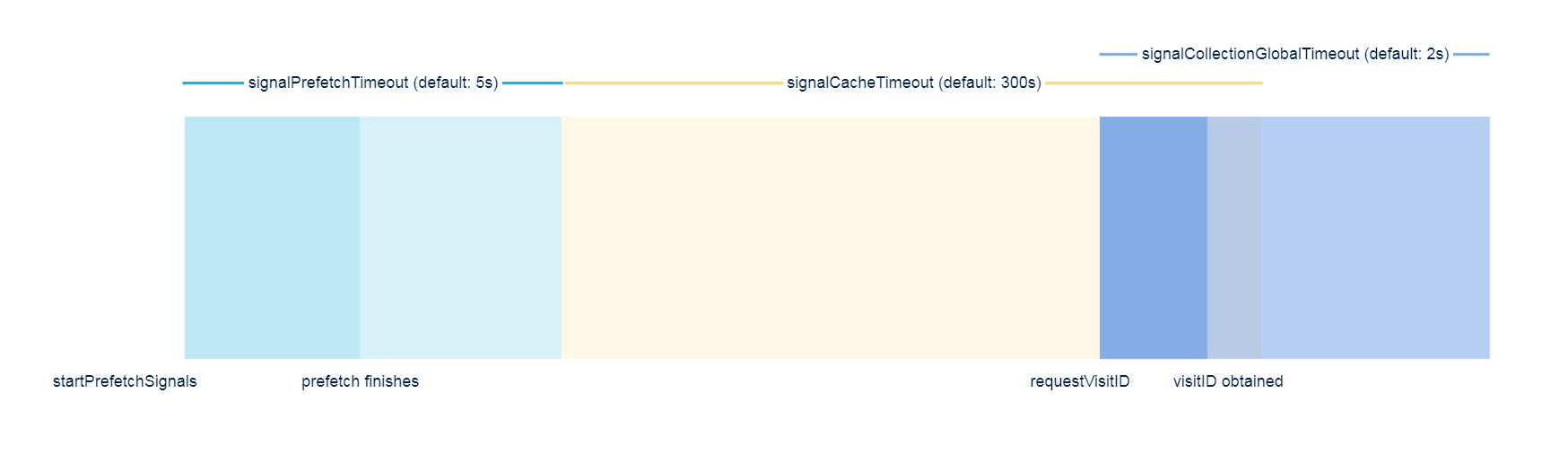
requestVisitIDmethod before returning an error. If a signal is not collected within the time interval, the Risk Management SDK sends a timeout signal error (524, "Signal has timed out") to the server. The default value is set to 2000 milliseconds.This is used in the
GAHCoreConfig.Builder.setSignalCollectionGlobalTimeout()API on Android.This is used in the
[GAHCoreConfig setSignalCollectionGlobalTimeout:]API on iOS.Calling the
startPrefetchSignalsmethod before therequestVisitIDmethod reduces the chance of having a timeout error, because the signals are cached. -
Signal prefetch timeout is the time (in seconds) to collect a signal before returning an error.
This is similar to the signal collection in global timeout, but it applies to the
startPrefetchSignalsmethod. The difference is, when the timeout is reached, it does not send a timeout signal to the server. Instead, it returns an error via therequestPrefetchStatuscallback. In the subsequentrequestVisitIDmethod, the Risk Management SDK attempts to collect the signal again. The default value is set to 5 seconds.This is used in the
GAHGemaltoSignalConfig.Builder.setSignalPrefetchTime()API on Android.This is used in the
[GAHGemaltoSignalConfig setSignalPrefetchTimeout:]API on iOS. -
Signal cache timeout is the timeout (in seconds) that applies to signals cached during the
startPrefetchSignalsmethod. The signals cached during this interval are usable in the subsequentrequestVisitIDmethod. Otherwise, therequestVisitIDmethod tries to fetch the signals again. The default value is set to 300 seconds.This is used in the
GAHGemaltoSignalConfig.Builder.setSignalCacheTime()API on Android.This is used in the
[GAHGemaltoSignalConfig setSignalCacheTimeout:]API on iOS.
The following figure illustrates the behavior of the three timeouts during the startPrefetchSignals method and requestVisitID method. The receiving of requestVisitID method is fast because it uses the signals cached during the startPrefetchSignals method.
How should I set the timeout to maximize the success rate for signal collection and visitID?
For signal collections that require an internet connection and might take a significant amount of time, such as activities in Threatmetrix, the following steps maximize the success rate of signal collection.
-
To prevent unsuccessful signals fetching from the
startPrefetchSignalsmethod, extend the signal prefetch timeout, especially when your internet speed is low. -
Call the
startPrefetchSignalsmethod prior to calling therequestVisitIDmethod. For example, when the registration page is shown, call thestartPrefetchSignalsmethod. When the end user taps Register, therequestVisitIDmethod is called. This leads to a shorter loading time because therequestVisitIDmethod uses the signals cached from thestartPrefetchSignalsmethod. -
Extend the signal cache timeout, if necessary, to ensure that the signals cached in the
startPrefetchSignalsmethod can be used in therequestVisitIDmethod. The signals might be outdated if the timeout is set too long. -
In certain scenarios where the
requestVisitIDmethod is not able to use the cached signals from thestartPrefetchSignalsmethod (for example, when the end user takes a long time to fill the registration page), extend the signal collection global timeout, so that the signals are collected successfully in therequestVisitIDmethod.

