



Risk Management mobile SDK
This section describes the uses of Risk Management SDK and the steps on how to integrate it with a mobile application. It explains how to adapt the functionality of Risk Management on the Android and iOS platforms.
Thales Assurance Hub is a smart risk-assessment platform in the cloud that allows organizations to assess every online session in real time.
As a hub, this platform comes with pre-integrated solutions from Thales partner vendors who bring their expertise in various fields, including:
- Identity verification
- Device profiling
- Cybercrime threat detection
- Behavioral biometrics
- Risk intelligence
As a part of the system, the Risk Management SDK is a mobile SDK that is compatible with iOS and Android devices. It collects attributes such as:
- Name and version
- Device ID
- Time zones
- Languages
- Jailbreak and rootkit detection
- Behavioral biometric data
The Risk Management SDK sends the signals collected on the device to the Risk Management back-end server, so that the back-end server can calculate a risk score.
The SDK provides the visitID received by the back end to the application, which the application back end can use to get the next step decision from the Risk Management back-end server. The application back end can further use the decision to determine additional authentication requirements, such as two-factor authentication, OTP, or biometric verification.
Mobile SDK architecture
The Risk Management SDK collects various device attributes (signals), such as OS name and version, IP addresses, device ID, time zones, languages, jailbreak or root detection, and behavioral biometric data. The Risk Management SDK sends the data collected on the device to the Risk Management back-end server for risk calculation. The Mobile SDK provides the visitID received from the Risk Management backend, this visitID is then used to reference the collected signals.
High-level flow of the Risk Management ecosystem
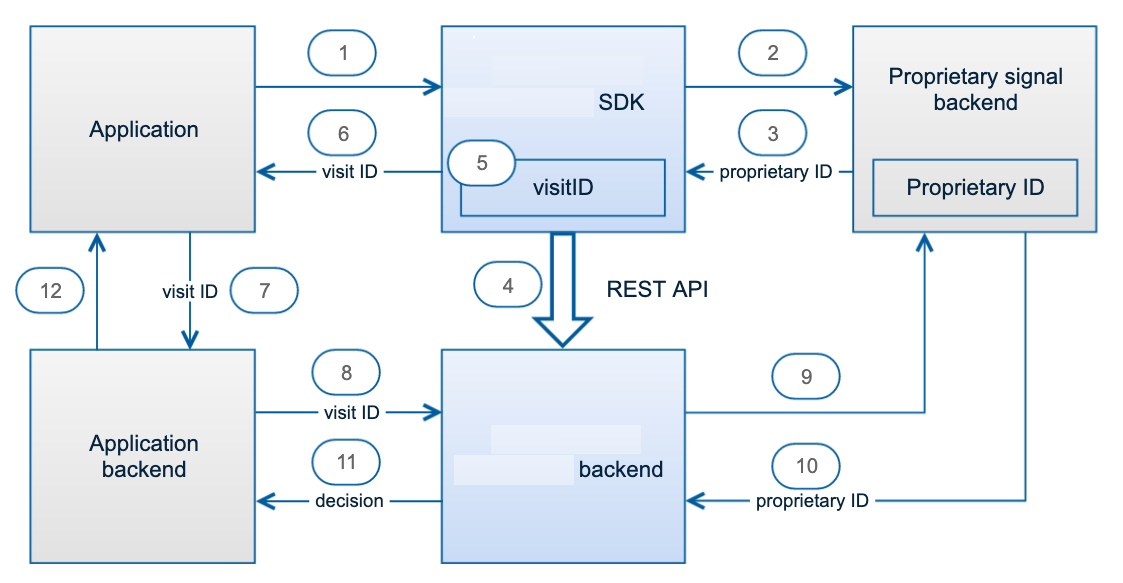
The following image illustrates the flow of how the signals are collected on the device, sent to the Risk Management back end, and referenced by the application back end.
-
The application requests the
visitIDfrom the Risk Management SDK. -
(Optional) Proprietary signal collection sends information to the proprietary signal’s own back end.
-
(Optional) Gets response (for example, a proprietary ID) from the proprietary signal’s own backend.
-
The SDK sends the signals to the Risk Management back end.
-
The Risk Management back-end server returns a
visitIDto the SDK. -
The SDK returns the
visitIDto the application. -
The application requests the application back end for the next step decision based on the
visitID. -
The application back-end server requests the risk score from the Risk Management back-end server against the same
visitID. -
(Optional) The Risk Management back-end server requests the proprietary risk score from the proprietary signal’s own back end with known information, such as a proprietary ID.
-
(Optional) The Risk Management back-end server gets the information for the risk calculation from the proprietary signal's own back end and generates a cumulative risk score.
-
The Risk Management back-end server returns the decision based on the cumulative risk score to the application back-end server.
-
The application back-end server returns the next step, decision to the application, which is ready to use for further authentication.
Note
-
Steps 2 and 3 are applicable only for ThreatMetrix signal groups.
-
Steps 9 and 10 are applicable only for ThreatMetrix and BehavioSec signal groups.
For details on proprietary signals used for the risk calculation, see signal groups and corresponding signals .
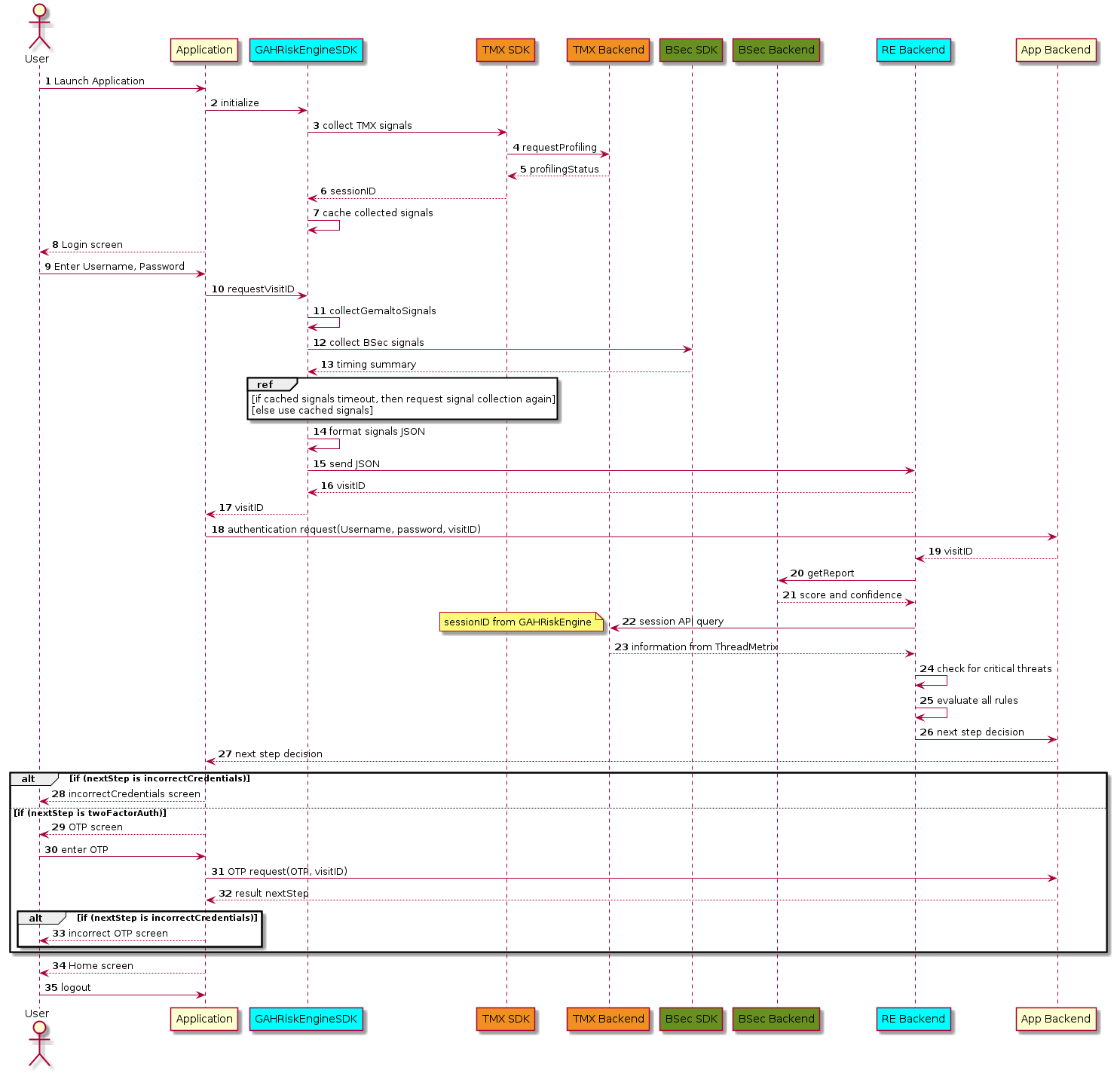
The following image depicts the sequence of operations among the host application, Risk Management SDK, Risk Management back-end server, and proprietary back-end servers.
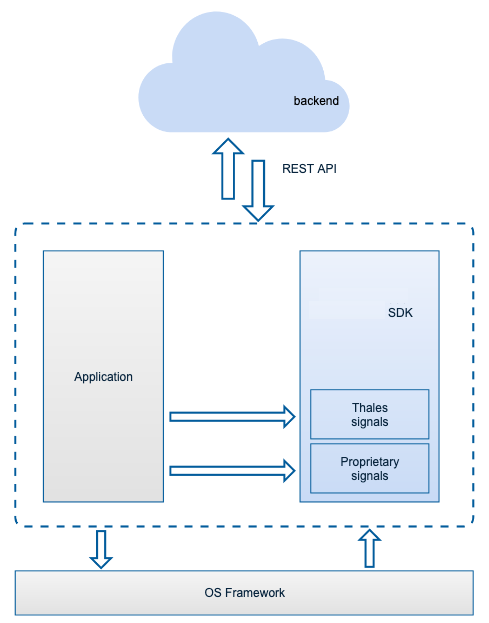
The following image depicts the component diagram of Risk Management and its ecosystem.
Risk Management SDK flow
The following image depicts the Risk Management SDK flow with the user, application, and back-end server.
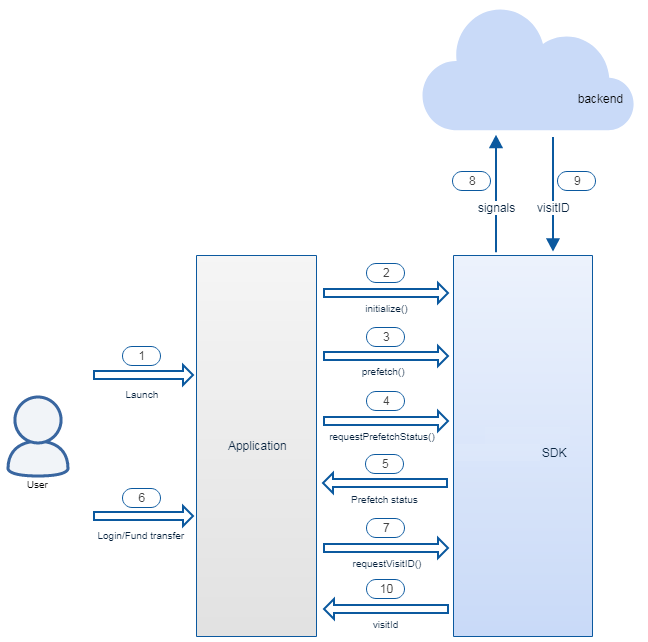
- The user launches the mobile application.
- The signals to collect are configured during SDK initialization.
- Signal prefetching starts. The signal collection is done in the background.
- The application requests the prefetch status.
- The prefetch status is received from the SDK.
- The user starts the operation in the mobile application.
- The application requests the visit ID from the SDK.
- The SDK sends signals to the Risk Management back end.
- The SDK retrieves the visit ID from the Risk Management back end.
- The SDK provides the visit ID to the application.
Mobile SDK variants
The Risk Management mobile SDK includes variants for different host application use cases. The following tables depict the use case for each variant.
Android platform
Variants
| No. | SDK variant | Description | Use case |
|---|---|---|---|
| 1 | External (Debug and Release) | All dependencies are packaged in the SDK. | This variant can be used by all the applications. |
Package structure
.
├── 3pty
│   └── TMXProfilingConnections-6.2-97.aar
├── apidocs
├── checksums.txt
├── docs
│   ├── ProgrammersGuide.txt
│   └── ReleaseNotes.txt
├── example
│   ├── IFPSDKSample
│   └── README.txt
└── external
    ├── debug
    │   ├── GAHRiskEngine.jar
    │   ├── arm64-v8a
    │   ├── armeabi-v7a
    │   ├── x86
    │   └── x86_64
    ├── dexguard
    │   └── dexguard-project.txt
    ├── proguard
    │   └── proguard-project.txt
    └── release
        ├── GAHRiskEngine.jar
        ├── arm64-v8a
        ├── armeabi-v7a
        ├── x86
        └── x86_64
iOS platform
Package structure
- external: Includes the standard Risk Management SDK.
You should use this unless advised otherwise by your Thales support team.
-
Release: Contains only the arm64 architecture. Use this variant for production.
-
Debug: Contains the arm64 armv7 i386 x86_64 architectures. Use this variant for debugging.
when your application contains other Thales DIS SDKs, such as Protector SDK:
-
Release: Contains only the arm64 architecture. Use this variant for production.
-
Debug: Contains arm64 armv7 i386 x86_64 architectures. Use this variant for debugging.
-
3pty: Contains third-party dynamic frameworks that need to be integrated into your application because the Risk Management SDK requires them during linking.
-
apidoc: Contains API documentation for the Risk Management SDK.
-
example: Contains example codes in Objective-C and Swift on how to use the Risk Management SDK.
Example applications use the external variant of the Risk Management SDK.
- docs: Contains information to access the Programmer's Guide and Release Notes.
├── 3pty
│   ├── TrustDefender.framework
├── apidoc
├── checksums.txt
├── docs
│   ├── ProgrammersGuide.txt
│   └── ReleaseNotes.txt
├── example
│   ├── objc
│   └── swift
└──── external
    ├── Debug
    │   └── GAHRiskEngine.framework
    └── Release
        └── GAHRiskEngine.framework
Third-party libraries
The Risk Management mobile SDK is packaged with these dependencies and is tested for the following versions of the libraries:
| Library | Android version | iOS version |
|---|---|---|
| BehavioSec | 2.1.0 | 2.2.2 |
| ThreatMetrix | 6.2-97 | 5.4-84 |
Risk Management SDK communicates with the Risk Management back-end server internally to get the visitID.
Android application size reduction
With more signal groups incorporated into Risk Management SDK, the size of the application increases. On Android, to optimize the application size, you can adopt Google's recommendation of publishing Android App Bundle on Google Play or to deliver multiple APKs.
Next
Risk Management includes native mobile SDKs for iOS and Android that embed signal collection directly in your app:

