



Evaluate risk with auth feedback
This page provides an end-to-end scenario that explains how to request a risk-based decision, enforce authentication, and report the result back to Risk Management.
In this scenario, the user wants to access or use some tenant resources, such as log in to the portal, perform some action, and so on. The tenant wants to make this as easy as possible for the user, while ensuring a good level of security.
The scenario allows the tenant to request a risk evaluation for the operation based on one or more risk management technologies. The result is a decision from the policy manager like authenticate with password, authenticate with OTP, denied, and so on.
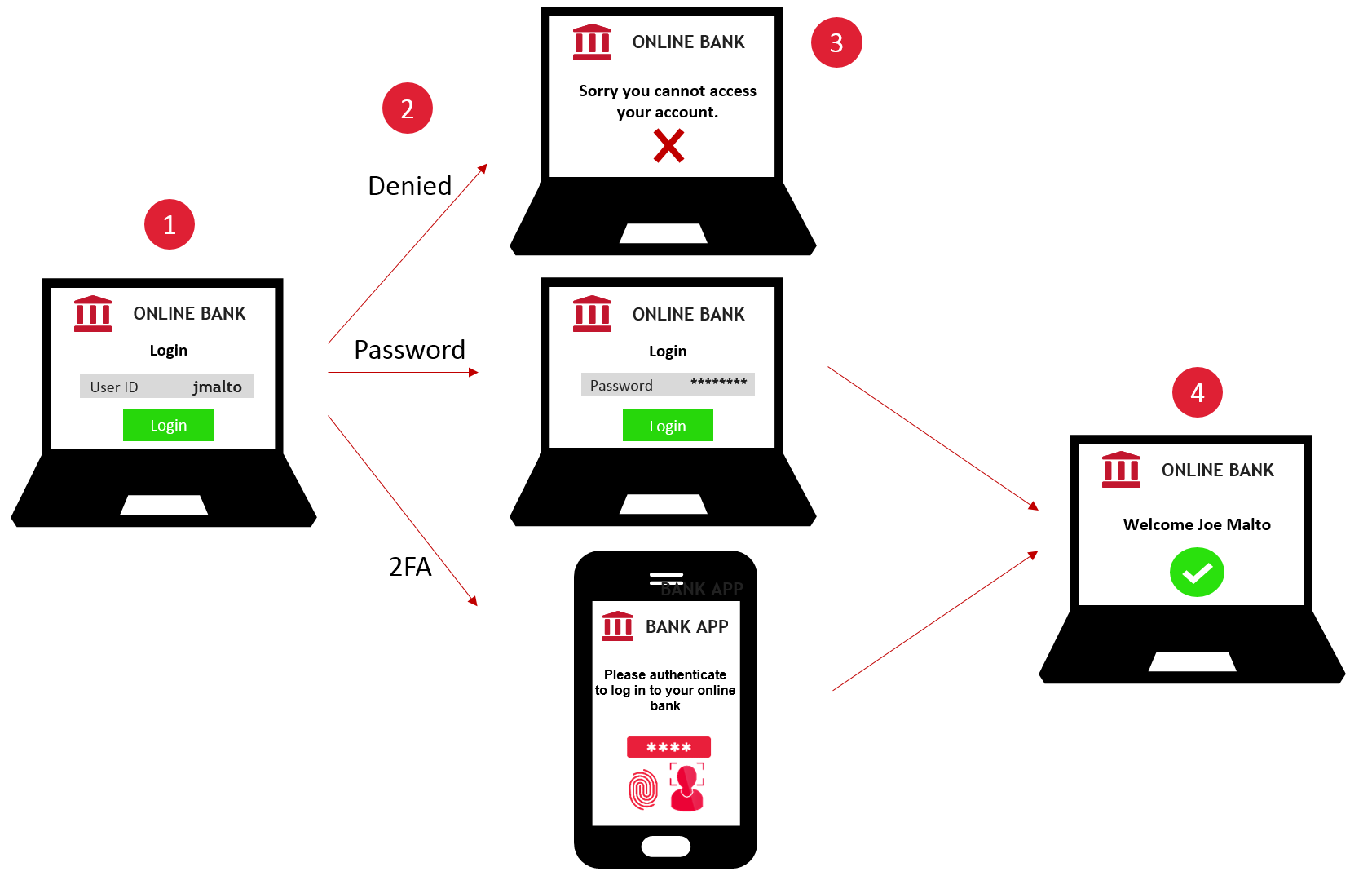
The tenant is in charge of enforcing this decision. If the decision is to authenticate with username and 2FA, the tenant needs to request the same level of authentication or higher from the user.
After the user is authenticated, the tenant must provide the result of this authentication back to Risk Management. To improve the quality of the risk evaluations, historical data on past authentication results plays an important role and allows the system to provide better decisions and improve the user experience.
Sequence diagram
The following sequence diagram shows the different steps to execute this scenario.
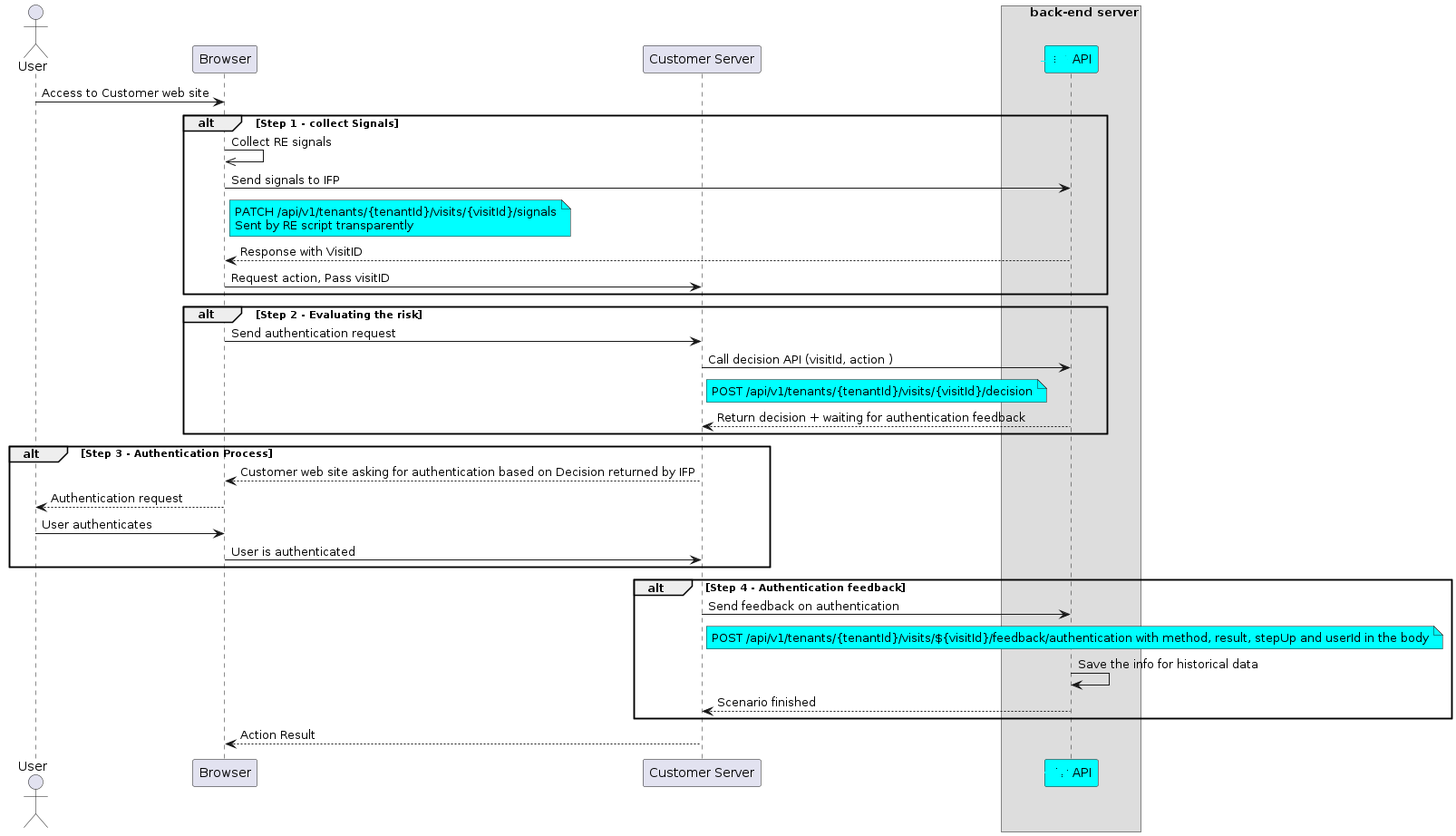
Collect signals
The first step requires you to modify a web or mobile application to collect signals from the user.
Risk Management offers three options that cover most use cases. You can choose to do one or more of the variants, depending on your needs and resources:
-
Integrate signal collection into a web page flow. See the web tutorial.
-
Integrate signal collection into an Android or iOS application. See the mobile tutorials.
Risk evaluation
This requests the risk evaluation for the user's operation. In the example below, several values need to be updated with your configuration.
- eyJ0…3jig is the Base64 encoded JWT that is used to authorize the request to the Risk Management service.
- 12345678-90ab-cdef-1234-567890abcdef is the API key that identifies a customer to Risk Management for quota and monitoring purposes.
- visitId value must be the one returned from the signal collection.
- userAttributes and risk objects provide the context of the operation used to apply the proper policies.
POST /scs/v1/scenarios
Accept: application/json
Content-Type: application/json
Authorization: Bearer eyJ0...3jig
X-API-KEY: 12345678-90ab-cdef-1234-567890abcdef

{
"input":
{
    "userId": "testUser",
    "userAttributes":
    {
    "email" : "testUser@gmail.com",
    "groups"   : ["default"]
    },
    "risk": {
    "visitId": "6e7d4ebf-8f67-4d6d-990d-208e0e0477ac",
    "destinationAccountNumber" : "RO49AAAA1B31007593840000"
    }
},
"name": "Evaluate_Risk_With_Authentication_Feedback"
}
The response contains several important values that must be parsed.
-
HTTP/1.1 201 is the overall result of the call. 201 means the execution was successful. Other values mean an error occurred (for example: 400 Bad Request means a client-related error occurred).
-
status: Waiting is the normal status. The first call performed the risk evaluation and now the scenario is waiting for the authentication result.
-
state.result.code: 0 - In case of an error during the risk evaluation, an error code is returned.
-
state.result.object.risk.decision is the decision from the policy manager. This dictates the next steps for the tenant. See authenticating for details.
HTTP/1.1 201
status: 201
Date: Thu, 20 Dec 2018 15:53:22 GMT
Content-Type: application/json;charset=UTF-8
Content-Length: XXX

{
    "id": "447578be-6d5a-4b37-a6fd-6673dcd608f3",
    "name": "Evaluate_Risk_With_Authentication_Feedback",
    "status": "Waiting",
    "state": {
        "steps": [
            {
                "id": "WaitForAuth",
                "name": "Waiting for Authentication",
                "status": "Waiting"
            }
        ],
        "result": {
            "code": "0",
            "message": "Risk operation completed",
            "type": "Risk_Response",
            "object": {
                "risk": {
                    "status": "SUCCESS",
                    "decision": {
                        "access": "allowed",
                        "auth": [
                            {
                                "type": "password"
                            }
                        ]
                    },
                    "decisionDetails": {
                        "gemaltoRiskEngine": [...],
                        "threatmetrix": [...]
                    },
                    "policy": {
                        "name": "BHV_test",
                        "id": "9eca761b-29cc-4bcd-f310-731e7db7cc13"
                    }
                }
            }
        }
    }
}
REST API
See evaluate risk with authentication feedback.
Authenticating
In [evaluate risk], Risk Management returned the decision of the policy manager for this operation. The decision can be one of the following:
- Password: User should authenticate with a password.
- OTP: User should authenticate with an OTP.
- 1FA: User should authenticate with a custom authentication method managed by the tenant.
- 2FA: User should authenticate with a custom authentication method managed by the tenant.
- 3FA: User should authenticate with a custom authentication method managed by the tenant.
- Denied: User should be denied the operation.
It is up to your tenant to decide what to do next. It should follow the decision and request that the user provide the proper level of authentication. Your tenant can also decide to use a higher level of authentication than recommended because, for example, the user does not have that exact authentication method available.
After the user is authenticated, you provide feedback on the authentication process to Risk Management.
Authentication feedback
The authentication feedback is called by the tenant back end after the authentication process is complete. Its purpose is to Risk Management with feedback about the result of the user authentication that just took place, such as whether it was successful, and which authentication method was used.
This additional data is used by Risk Management to keep a record of the authentications for devices and users. This log allows the use of conditions based on authentication history.
The following authentication methods are allowed:
- Password: The user logged in with a password
- OTP: The user logged in with an OTP
- 1FA: The user logged in with a custom authentication method managed by the tenant.
- 2FA: The user logged in with a custom authentication method managed by the tenant.
- 3FA: The user logged in with a custom authentication method managed by the tenant.
The example below provides an example of such feedback. The user was presented with a password login method and successfully authenticated.
In the example below, several values need to be updated with your configuration.
- eyJ0…3jig is the Base64 encoded JWT used to authorize the request to the Risk Management service.
- 12345678-90ab-cdef-1234-567890abcdef is the API key that identifies a customer to Risk Management for quota and monitoring purposes.
Feedback example
PATCH /scs/v1/scenarios/5b54d59f-a747-4913-ae03-c4ba54b79bde/state/steps/WaitForAuth
Accept: application/json
Content-Type: application/json
Authorization: Bearer eyJ0...3jig
X-API-KEY: 12345678-90ab-cdef-1234-567890abcdef

{
"name": "Evaluate_Risk_With_Authentication_Feedback",
"input":
    {
        "risk": {
            "method": "password",
            "result": "success",
            "stepUp": false
        }
    }
}
The response is fairly straightforward and only the results of the operation need to be checked:
- HTTP/1.1 202: The scenario was successfully patched.
- status: Finished - The scenario is finished.
- state.result.code: 0 - The last update completed successfully. If an error occurred, the state.result.object.fpp object contains more details about the error.
Response Example
HTTP/1.1 202
status: 202
Date: Thu, 20 Dec 2018 15:53:22 GMT
Content-Type: application/json;charset=UTF-8
Content-Length: 231

{
"id": "5b54d59f-a747-4913-ae03-c4ba54b79bde",
"name": "Evaluate_Risk_With_Authentication_Feedback",
"status": "Finished",
"state": {
    "result": {
    "code": "0",
    "message": "Risk operation completed",
    "type": "Risk_Response",
    "object": {
        "fpp": {
            "result": "OK"
        }
    }
    }
}
}

