



Enhanced edition tutorials
These hands-on tutorials helps you quickly integrate a simple risk evaluation feature into an existing web or mobile application.
The goal is to update an existing web page or mobile application to collect signals from the end user. Then in a second step, your back-end application can request a risk evaluation analysis to decide if you should continue with the operation.
The diagram below shows an overview of how the web application version works. The mobile integration is almost identical, except it uses Thales SDKs instead of Javascript.
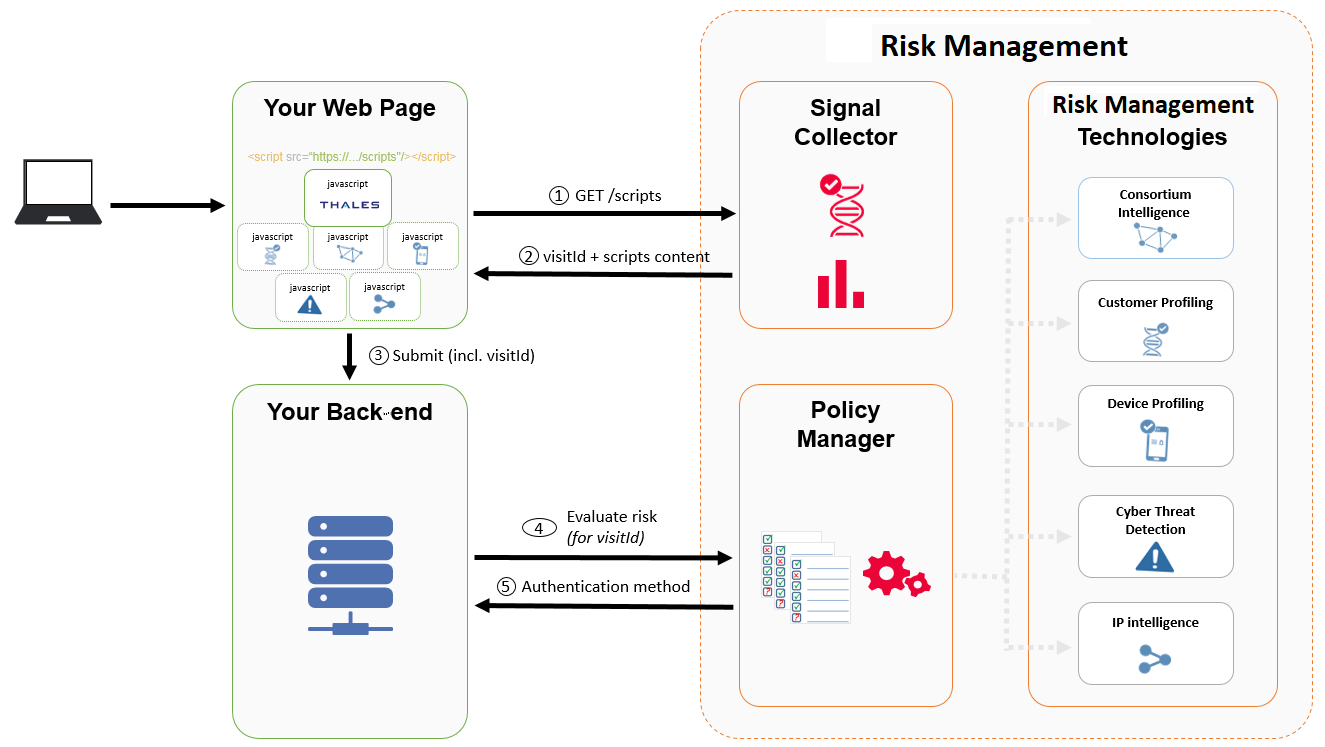
How the tutorials work
The tutorials have two steps:
- Collect signals: Embed signal collection on web and mobile.
- Evaluate risk: Call the risk evaluation API.
Collect signals
The first step requires you to modify a web or mobile application to collect signals from the end user.
There are three options that cover most end user cases. You can choose to do one or more of the variants, depending on your needs and resources:
- Integrate signal collection into a web page flow.
- Integrate signal collection into an Android application.
- Integrate signal collection into an iOS application.
Evaluate risk
In this step, your mobile back end calls our REST API to request a risk management analysis based on the policy rules defined for your setup. The output is an evaluation of what should be the next step, such as allow the user to log in with just their username and password. Another output could be to deny the user access to your website because the behavior analysis failed to recognize the user.
Evaluating a risk is common to all the signal collection variants.
Next step
Choose one of the platform-specific guides for embedding the Risk Management signal collector in your application:
- Collect signals from a web page
- Collect signals from a mobile application: There are tutorials for both Android applications and iOS applications.

