



Policies
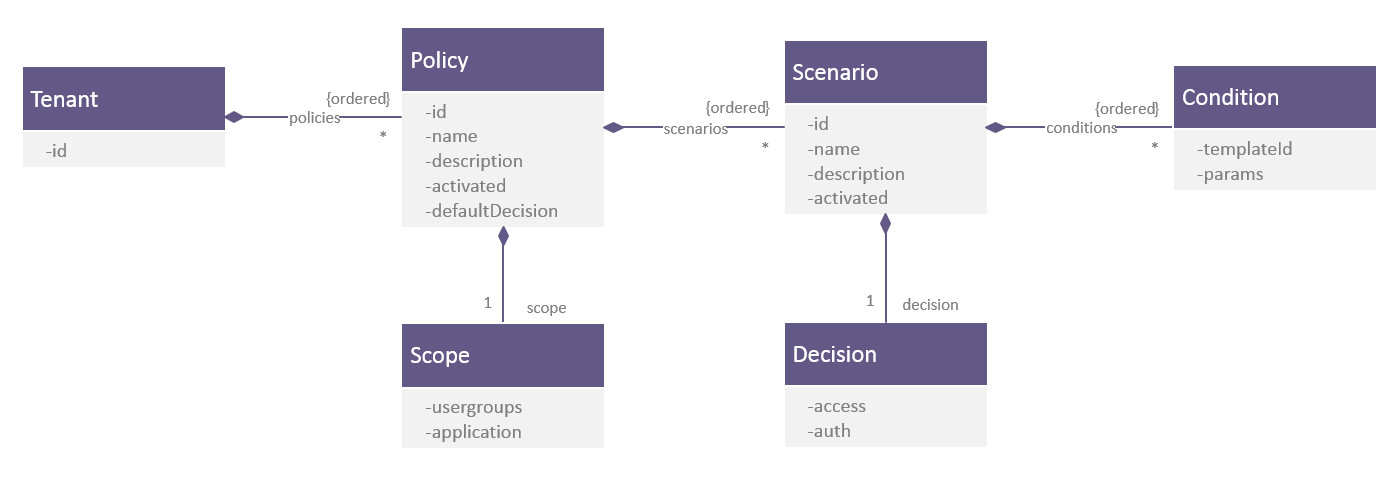
A policy is defined as the combination of a scope, a set of policy manager scenarios, and a default decision.
The policy scope is a subset of an execution context to which the policy applies. It is passed to the policy manager when calling the GET decision endpoint. The execution context can comprise information, such as user characteristics (usergroups), security attributes (level of sensitivity), and so on.
A policy manager scenario groups together a set of conditions and a decision to use if the conditions are fulfilled. Zero, one, or many scenarios can be defined for each policy.
A decision represents a recommendation resultant of the evaluation of a policy manager scenario or policy. The following are the possible decisions:
-
Denied: The transaction should be blocked.
-
Granted with authentication method: The transaction should be allowed if the user correctly presents the suggested authentication method. The following methods are supported:
-
Password: The user must present a password.
-
OTP: The user must present a one-time-password (OTP).
-
1FA, 2FA, or 3FA: The user must present a custom authentication method managed by the tenant. This decision can represent any method that the tenant wants. For example, 1FA can mean fingerprint for one tenant, while it means secret question, QR code scanning, or a combination of methods such as fingerprint + OTP for another.
-
-
Approved immediate or review: Indicates a request can be immediately accepted or that it needs to be reviewed by some specialist. For example this decision could be used for new user use cases.
A default decision is the decision that is returned at the end of the policy evaluation if no other decision was made during the evaluation.
Global policy
Risk Management must always have a global policy that is used as the default if none of the other policies apply.
The default policy has the following configuration:
-
Scope: The scope is empty, meaning it applies to any context
-
Policy manager scenarios: It can optionally contain a set of policy manager scenarios
-
Decision: It has a default decision that the policy manager returns if no other policy matches during the evaluation.
You can define several additional policies, as required, up to a maximum of 20. In these additional policies, the scope and set of policy manager scenarios are always defined, but the default decision is optional. If absent, the policy manager evaluates the next policy.
Policy schema
The schema below illustrates the relationship between all these components:
The policies defined for your organization are evaluated by calling the endpoint POST decision of the Risk Management API.
How policies are evaluated
The body of the HTTP request comprises the complete execution context of this evaluation (including the targeted event, user groups, level of sensitivity, and so on). When this context contains data compliant with the scope that is defined for a policy, then the policy is considered as matched.
The policy manager evaluates the policies in the order that you define. If none of these policies can be matched (that is, none of their scopes match the provided context), then the global policy is applied.
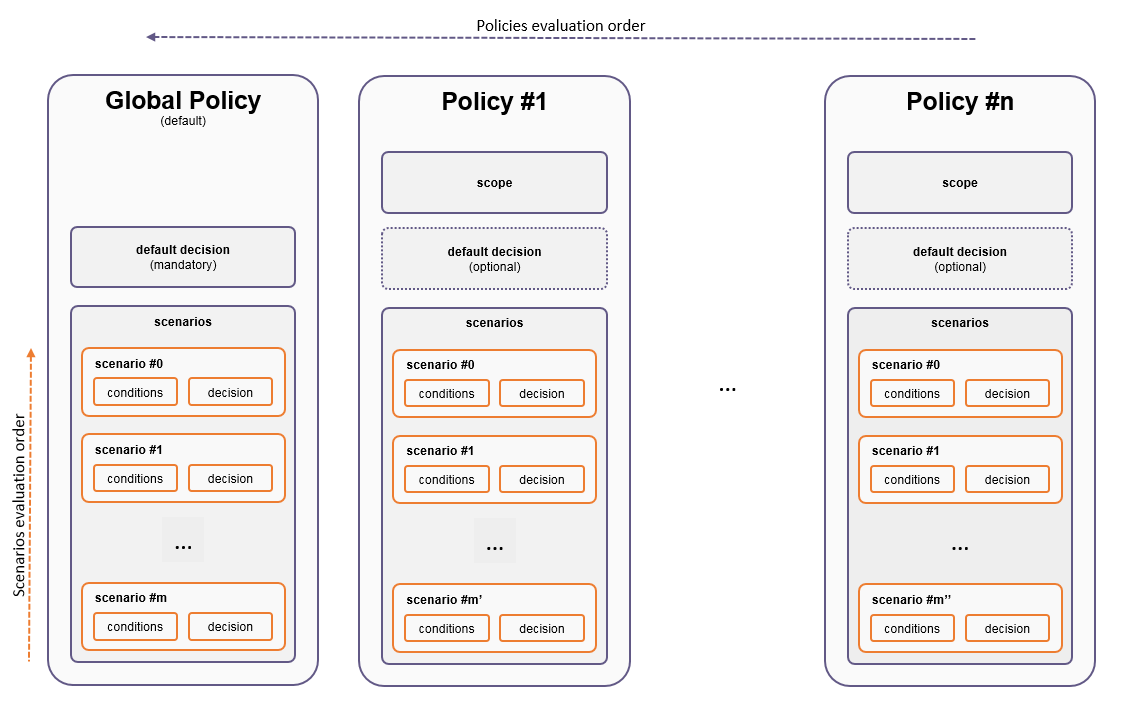
When a policy matches, then its policy manager scenarios are evaluated. The policy manager scenarios within a policy are evaluated in the order that you define. If none of the policy manager scenarios matches then the default decision is evaluated:
- If a default decision is defined, the policy’s default decision is returned.
- If no default decision is defined for that policy, the next policy in the defined order is evaluated.
When evaluating a policy manager scenario, the policy manager evaluates all its conditions. If all of the conditions are true, then this policy manager scenario is considered as matched and its decision is returned. On the contrary, if at least one condition is not true, then the policy manager scenario is considered as not matched, and the next scenario in the policy is evaluated.
Policies and policy manager scenario structures
The following diagram gives an overview of the policies and policy manager scenarios structures:
Manage policies on the console
The console enables you to manage polices, search requests, manage scores in the different Risk Management technologies, and look at the audit trail.
Below is the login window for the Risk Management console.

During their first login, a user is asked to change the password according to the policy:
- must be at least 10 characters long
- contains at least one lowercase letter [a-z]
- contains at least one uppercase letter [A-Z]
- contains at least one digit [0-9]
- contains at least one special character from the set [!@#$^&*()_-+=,.?]
- other characters are not supported
- not used recently is set to 3.

In addition, the user is prompted to set up mobile authentication:

This provides a quick walkthrough of the policy manager part of the Risk Management console. The policy manager is in the left panel.
Define policies
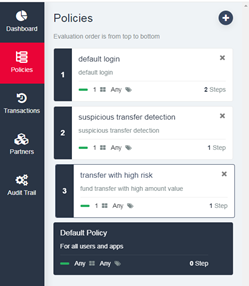
The first step is to define policies. Typically, each policy can match an event. In the screenshot below, policy 1 is associated with a login event and policies 2 and 3 are associated with payment events. The policies are evaluated in numerical order.
Create steps in the policy manager scenarios
A policy manager scenario has one or more steps. Each step is a condition and optionally can define a decision for that step if the condition is met. At the scenario level, there is optionally a default decision for the case where none of the conditions in the steps are met.
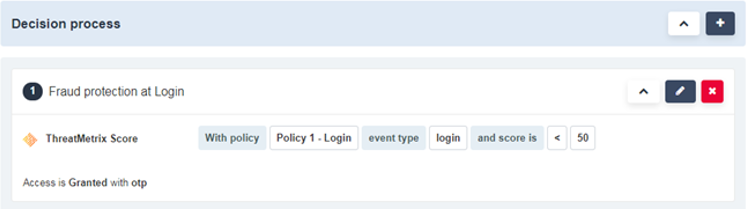
In the screenshot below, the administrator has defined a policy manager scenario within the default login policy. In this scenario, if the score returned by Risk Management is below 50, the decision is to require the user to enter their OTP.
Create a scenario using multiple technologies
Let’s imagine that your applications are configured to systematically request a password and an OTP. In the screenshot below, you define a scenario within the policy. In this scenario, if the score calculated by a first partner is more than 50, and the score calculated by a second partner is high (meaning low risk), then it is possible to improve the user experience by requesting a password only.
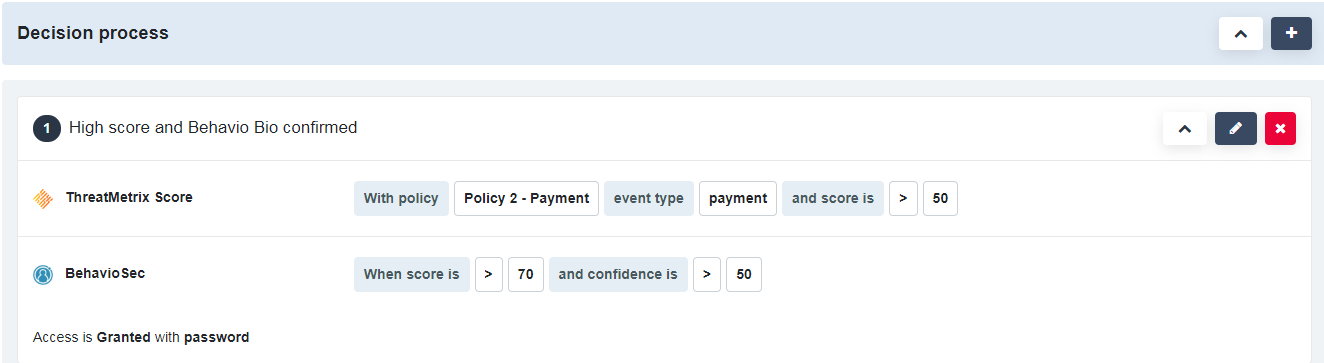
Conversely, you might decide that if both partners have bad scores, the request is denied.
Refine the policies and scenario by context
In the example from create a scenario using multiple technologies, it might not be enough to make a decision based solely on an event. You could configure the scenarios to take one or more contexts into consideration:
Example 1: Sensitive operations:
It might be wise to decline the transaction only if the context is a highly sensitive operation.
Example 2: Security expectations of users
Improving the user experience by requesting only a password might make sense for some segments of users who are not sensitive to security, while it could create an impression of poor security for a segment of users who are more comfortable when they need to provide an OTP to proceed, even if the risk is actually low. Here again, using a user-security segment context can enable a more accurate decision.
Consider scores and flags calculated outside of Risk Management
The goal here is to benefit from as many sources as possible, going beyond the engines that are embedded in Risk Management to make a decision. It is possible that the tenant has already developed ways to raise flags or evaluate a score, and might already use some third parties to calculate these.
Example 1: Add a flag for request monitoring
It is possible that the tenant can estimate whether a request looks usual for a particular user. In this case, such a flag can contribute to the decision of stepping down when associated with high scores for both partners.
Example 2: Add a flag for device fingerprinting
In this example, the tenant can already verify whether the device is already known, thanks to powerful device fingerprinting capable of generating one or more flags or a scoring. Here again, this information can be used to double-check the scoring done within Risk Management or, more simply, to contribute to making the right decision within a policy manager scenario.
Unlimited possibilities
You can define as many policies and decisions as required. During the evaluation, the policy manager evaluates the policies respecting the order that you define.

