



Attribute mapping
Attribute mapping manages how identity attributes align across systems for a tenant. To ensure accurate, consistent, and seamless data exchange between your organization and the features in the OneWelcome Identity Platform, you define explicit mappings.
When you create the attributes that correspond to your current schema, they are saved in the OneWelcome Identity Platform identity store. You can then map the attributes in the OneWelcome Identity Platform schemas to the attributes that you created in the identity store.
Schemas
The OneWelcome Identity Platform provides a flexible data model that supports several schema types:
-
SCIM core schema:
urn:scim:schemas:core:1.0All attributes in the core schema come from the System for Cross-domain Identity Management (SCIM) specification, which is an industry-standard specification for managing identities. It includes attributes such as first name, last name, email address, username, and so on. -
OneWelcome Identity Platform schema extension:
urn:scim:schemas:extension:iwelcome:1.0This schema extension consists of proprietary attributes, such as state, tenant, and so on. These attributes are essential for the core to work with the identity apps in the platform, such as consent, mobile identity, and user delegated manager. You cannot edit the OneWelcome Identity Platform schema. -
OneWelcome Identity Platform identity provider extensions: These are schema extensions for social identity providers that aren't integrated with the identity broker. If you configured external identity providers in the identity broker, you don't need to map these schemas.
-
urn:scim:schemas:extension:iwelcome:1.0:apple urn:scim:schemas:extension:iwelcome:1.0:facebookurn:scim:schemas:extension:iwelcome:1.0:google-
urn:scim:schemas:extension:iwelcome:1.0:microsoft -
Custom schema extension: The custom attributes that you create in the identity store are added to the custom schema. The identity store supports only one custom schema.
Metadata schemas
In addition to the attribute schemas, the identity store includes metadata schemas based on NIST 8112. The metadata provides the necessary context for understanding the value of the actual attribute. For example, the metadata stores when the attribute was created and last updated, but also stores what processing purpose the user consented to, where the data came from, and what the trust level is.
The metadata are stored in schemas that you can map to your custom schema:
urn:scim:schemas:extenion:iwelcomeattributemetadata:1.0
urn:scim:schemas:extension:iwelcomeattributevaluemetadata:1.0
Default attribute mappings
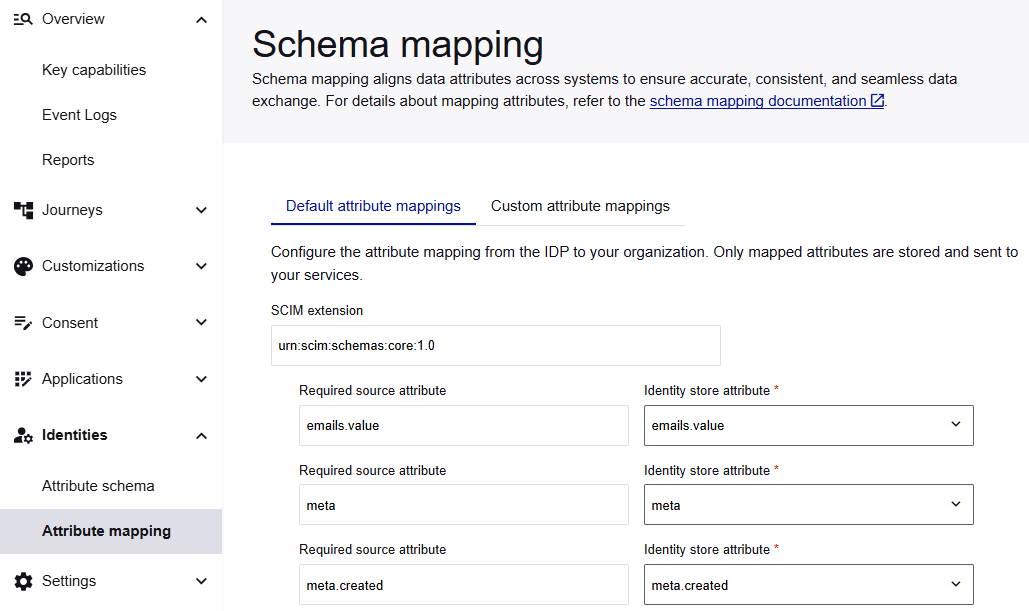
On the Schema mapping page, the Default attribute mappings tab lists the required attributes from the SCIM core schema (urn:scim:schemas:core:1.0) and the OneWelcome Identity Platform schema extension (urn:scim:schemas:extension:iwelcome:1.0).
For a newly provisioned tenant, the system maps the required attributes to your custom attributes in the identity store.
Each mapping links a single source attribute to a single destination attribute in the identity store.
Mappings are organized by SCIM extension and sorted alphabetically, with required attributes surfaced at the top. The required attributes are labeled Required source attribute.
Metadata filtering
To reduce configuration errors and improve data consistency, only compatible identity store attributes are listed. The system filters the list of identity store attributes for each source attribute based on the following metadata:
- Data type (string, boolean, decimal, integer, or dateTime)
- Multi-valued (true or false)
These are also metadata properties that you select when you add a custom attribute.
Complex attribute mappings
When you map a complex attribute to another complex attribute, the sub-attributes aren't mapped automatically. You need to map the sub-attributes individually. In the list of attributes, sub-attributes are represented with a dot character as parentAttributeName.childAttributeName, such as address.streetName or address.streetNumber.
Map default attributes
The system provides default mappings for the custom attributes that you add to the identity store. At a minimum, you must ensure that the required attributes are mapped to the appropriate attributes in the identity store. You must map the required source attributes before you can save changes. You can also map the other (non-required) attributes and add extensions, such as the metadata extensions, and their attributes.
You can only map an attribute once. To prevent duplicates, the system removes the mapped attributes from the selection lists.
Caution
If you navigate away without saving, all unsaved changes (including deleted or newly added mappings and extensions) are lost when you discard the changes or reload the page.
-
On the OneWelcome Identity Platform console, select Identities > Attribute mapping.
The Default attribute mappings tab lists the SCIM core schema (
urn:scim:schemas:core:1.0), the OneWelcome Identity Platform schema extension (urn:scim:schemas:extension:iwelcome:1.0), and their required attributes. -
Under the first SCIM extension,
urn:scim:schemas;core:1.0, for each Required source attribute, select the corresponding Identity store attribute to map it to. -
For the
urn:scim:schemas:extension:iwelcome:1.0, map each Required source attribute to a corresponding Identity store attribute. -
Save the mappings.
Changes are only saved when you select Save. Discard resets to the last saved state.
Add attribute mappings
-
Scroll to the bottom of the list of attribute mappings and select Add attribute mapping.
-
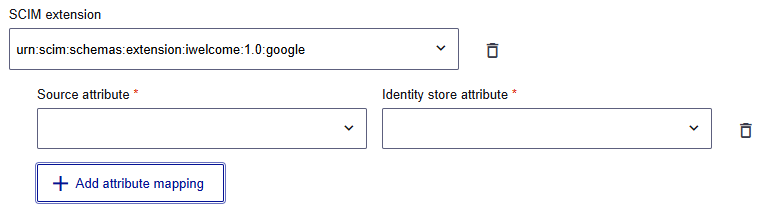
Select a Source attribute.
-
Select the corresponding Identity store attribute to map it to.
Add a SCIM extension
-
On the Default attribute mappings tab, scroll to the bottom and select Add SCIM extension.
-
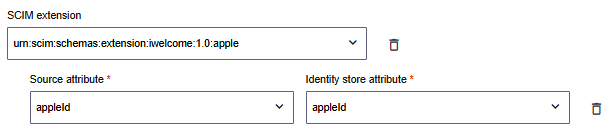
Select the SCIM extension and then add attribute mappings.
Delete an extension or attribute mapping
You can delete the extensions and attribute mappings that you add. When you delete an extension, the attributes are also deleted. However, you cannot delete the required attributes or the SCIM core schema (urn:scim:schemas:core:1.0) and OneWelcome Identity Platform schema extension (urn:scim:schemas:extension:iwelcome:1.0).
To delete an extension or attribute mapping, select the delete icon.
Custom attribute mappings
On the Custom attribute mappings tab, there is only one custom SCIM extension. When you create custom attributes, they are added to a custom SCIM extension. By default, this SCIM extension is named urn:scim:schemas:extension:custom:1.0.
You can rename the custom extension. The custom extension name supports only alphanumeric characters and must be in the format urn:scim:schemas:extension:<name>:1.0.
After you add attribute mappings, you can no longer rename the custom schema (unless you delete the custom attributes in the schema).
All other mapping functions are the same as those on the Default attribute mappings tab.

