High Availability Indirect Login
This section describes High Availability (HA) Indirect Login, a feature that allows you to create and maintain High Availability programmatically by using extensions to the PKCS#11 API. HA Indirect Login allows you to program your own complete HA environment, in full, or tie into (integrate with) suitable COTS High Availability solutions that provide a suitable Application Interface, using HA Indirect Login calls to handle common authentication among HSM partitions in groups.
If you are looking for information about client-mediated HA, which is the majority of HA implementations among Luna HSM customers, refer to High-Availability Groups.
Overview of High Availability Indirect Login
HA Indirect Login allows a secondary partition to be configured to cache the authentication state for a user, and for these cached credentials to be used to re-achieve an authenticated state using the HA Indirect Login exchange between the secondary partition and the primary partition. In pre-firmware-7.7.0 versions of HA Login (v1), this is achieved by caching the login credentials for a user.
HA Login can be viewed as the following two distinct steps:
>HA Login setup. For more information, refer to High Availability Login Setup.
> An HA Login exchange. For more information, refer to High Availability Login Exchange.
High Availability Login Setup
HA Login Setup requires the generation of an RSA key-pair to be used as the HA Login Public and Private keys. HA Login Setup is then done by transferring some of the HA Login Public/Private key material to a secondary partition and calling the CA_HAInit() API as an authenticated role on the secondary partition.
The key material that needs to be transferred varies based on the version of the HSM being used. It may be the HA Login Private Key, the HA Login Public Key or a PKC chain for the HA Login Private Key. The specific key material required is defined later in this section.
High Availability Login Exchange
The HA Login Exchanges is the specific exchange of information between a primary partition and a secondary partition used to achieve an authenticated state on the secondary partition.
The exchange of information is performed using a set of PKCS#11 extensions that are dedicated to the HA Login Protocol. The specific APIs and their calling sequence are defined later in this section.
High Availability Login HSM and Partition Policies
There are no HSM level policies related to the HA Indirect Login Protocol.
Each partition has a policy called ‘allow high availability recovery’. This policy must be enabled for any partition (primary or secondary) to take part in HA Login Setup or an HA Login Exchange.
NOTE In order to implement High Availability Recovery, the primary and secondary tokens must exist on separate systems.
High Availability Login Public and Private Keys
The HA Login Public and Private Keys are a standard user RSA key-pair on the partition. As such, it is possible for any authorised role on the primary partition to make use of the HA Login Public and Private Keys in the context of HA Login Setup and/or an HA Login exchange.
For the HA Login Public and Private Keys to be valid for use with the HA Login Protocol, they must have all of their key-usage attributes set to false. The required attribute templates are defined in later sections. Any additional restrictions put on the HA Login Public and Private Keys are defined in the protocol version specific sections in this document.
Supported HSM Roles
The HSM supports many different roles which vary depending on which version of the product is being referenced and which types of partition is being discussed. The next two tables define which roles are supported on which versions and which roles support HA Login Setup.
Roles that can generate the HA Indirect Login public/private key-pair
| Roles | ||||||||
| Firmware
Versions |
HSM SO | HSM Admin | Audit | PSO | Crypto Officer | Limited Crypto Officer | Crypto User | |
| < 6.22.0 (pre-PPSO) | Yes | N/A2 | No | N/A2 | Yes1 | N/A2 | No | |
| >= 6.22.0 < 7.7.0 | Yes | Yes | No | No | Yes | N/A2 | No | |
| >= 7.7.0 | Yes | Yes | No | No | Yes | Yes | No | |
Roles that can be set up for HA Indirect Login
| Roles | ||||||||
| Firmware
Versions |
HSM SO | HSM Admin | Audit | PSO | Crypto Officer | Limited Crypto Officer | Crypto User | |
| < 6.22.0 (pre-PPSO) | Yes | N/A2 | No | N/A2 | Yes1 | N/A2 | Yes1 | |
| >= 6.22.0 < 7.7.0 | Yes | Yes | No | No | Yes | N/A2 | No | |
| >= 7.7.0 | Yes | Yes | No | No | Yes | Yes | Yes | |
1 On pre-PPSO partitions (before Partition SO was introduced), the partition maintains only a single HA Login state. This means that the partition can be setup for HA Indirect Login for a single login only. For example, if the CO calls the CA_HAInit() API, then the HA Indirect Login state stores the role ID for the CO and the CO authentication state can be re-achieved using the HA Indirect Login Protocol. If the CU then decides to call the CA_HAInit() API, this overwrites the current HA Indirect Login state with the role ID for the CU. This means that the CO authentication state can no longer be re-achieved using the HA Indirect Login Protocol, an HA Indirect Login exchange with this partition will now achieve only the CU authentication state.
2 This role does not exist on this version.
TIP Where you have an HA Indirect Login setup, your HSM is made accessible by other HSMs. Adding a challenge secret to your role, that is unknown to other parties, does not prevent other parties from logging into your HSM. Rather it prevents other parties from using your particular role without that extra credential. To prevent other parties accessing your HSM, change the PIN.
High Availability Indirect Login Functions Prior to Luna HSM Firmware 7.7.0
This section provides the following information, relevant to the HA Indirect Login protocol prior to Luna HSM Firmware 7.7.0:
>High Availability Indirect Login Protocol
High Availability Indirect Login Protocol
The version of the HA Indirect Login Protocol discussed here is used by all HSMs running firmware version 6.0.0 up to Luna HSM Firmware 7.4.0. This protocol has been in use for many years and has received the following two major changes:
>Support for the HA Login Public Key
Prior to firmware version 6.10.0, the firmware required that the HA Login Private Key be cloned to the secondary partition so that a role on the secondary partition can be initialized for HA Login. Firmware 6.10.0 was updated such that the HA Login Public key could be used to initialize a role on the secondary partition. This eliminated the need to first initialize the secondary partition with the same cloning domain as the primary so that the HA Login Private Key could be cloned. Now the HA Login Public key can be extracted and re-created on the secondary directly.
The public key based setup is typically used when the secondary should only be able to act as a secondary and should not be able to act as a primary. If both partitions should be able to act as the primary and secondary, then the HA Login Private Key based setup should be used.
>Per-Partition SO
Firmware version 6.22.0 introduced the Per-Partition SO (PPSO) feature. This feature introduced a new partition type (PPSO partition) that supports its own security officer role, the Partition Security Officer (PSO), as well as a greater level of role separation between the Crypto-Officer and Crypto-User.
The existing role behavior was maintained and was available through the use of a Legacy pre-PPSO Partition. Non-PPSO partitions were deprecated in 7.x HSMs, but are mentioned here for anyone seeking to migrate from older Luna HSMs.
On a Legacy pre-PPSO Partition, when HA Login is setup, the Crypto-Officer or the Crypto-User is required to execute the command to setup HA Login. The role ID of the role that issues the command is stored in the partition so that when the HA Login exchange is performed, the same level of authentication as the role that setup HA Login is restored. The Legacy per-PPSO Partition only maintains one set of state information for HA Login. This means that at any time, the Crypto-Officer or the Crypto-User can re-issue the HA Login setup command to override which role’s authenticated state will be restored by an HA Login exchange.
On a PPSO partition, only the Crypto-Officer can be setup for HA Login.
Cryptographic Primitives
The pre-7.7.0 HA Login Protocol makes use of the following cryptographic primitives for the purposes of key wrapping and key transport:
>AES-256-ECB Encryption/Decryption
>RSA-PKCS v1.5 Encryption/Decryption
During HA Login Setup, a random AES 256-bit is wrapped using RSA-PKCS v1.5.
The HA Login Exchange is essentially key transport operation that is used to transport wrapped key material from the secondary to the primary, and then wrapped key material sent back to the secondary from the primary.
The key-transport is performed using RSA-PKCS v1.5, and it transports the random AES 256-bit which was wrapped using RSA-PKCS v1.5 during HA Login Setup.
The key material sent back to the secondary from the primary is wrapped using AES-256-ECB.
NOTE The pre-7.7.0 protocol does not place any size restriction on the HA Login Private Key. If the HSM-level policy to allow non-FIPS algorithms is disabled, then the FIPS related key size restrictions are applied to the key generation routines. When using Luna HSM Firmware 7.7.0 (or newer) as primary, the user should ensure to use different RSA Key pair to setup a pre-7.7.0 HA Login and 7.7.0 HA login -- otherwise there is a minor risk of being non-compliant with FIPS rules.
Initialization Functions
Initialization of tokens in a high-availability environment involves three steps:
1.The generation of an RSA login key pair (the public key of the pair may be discarded),
2.Cloning of the private key member to the User (and optionally to the SO) spaces of all tokens within that environment and,
3.Calling the CA_HAInit function on all tokens within that environment, in the context of the session owned by the User or SO.
The first two steps are performed using ordinary key generate and cloning Cryptoki function calls. The CA_HAInit function is implemented as follows:
CA_HAInit()
Initialize a token in an HA environment. This function requires an RSA private key that has been cloned to all members in the environment.
CA_HAInit(CK_SESSION_HANDLE hSession,
          CK_OBJECT_HANDLE  hLoginPrivateKey);
| I/O | Input | Description |
|---|---|---|
| In | hSession |
The session handle, logged-in by the user who owns the login key. |
| hLoginPrivateKey |
The object handle of the login key. |
Recovery Functions
The HA recovery mechanism requires the following commands and interface functions:
CA_HAGetMasterPublic()
Called on the primary token, this function retrieves the primary token's Token Wrapping Certificate (TWC) and returns it as a blob (octet string and length).
CA_HAGetMasterPublic(CK_SLOT_ID   slotId,
                     CK_BYTE_PTR  pCertificate,
                     CK_ULONG_PTR pulCertificate);
| I/O | Argument | Description |
|---|---|---|
| In | slotId |
The slot number. |
| Out | pCertificate |
Pointer to the TWC certificate string. |
| pulCertificate |
Pointer to the value to hold the TWC certificate length. |
CA_HAGetLoginChallenge()
Called on a non-primary member token, this function accepts the TWC blob and returns the member's login challenge blob.
CA_HAGetLoginChallenge(CK_SESSION_HANDLE hSession,
                       CK_USER_TYPE      userType,
                       CK_BYTE_PTR       pCertificate,
                       CK_ULONG          ulCertificateLen,
                       CK_BYTE_PTR       pChallengeBlob,
                       CK_ULONG_PTR      pulChallengeBlobLen);
| I/O | Argument | Description |
|---|---|---|
| In | hSession |
The public session handle. |
| userType |
The user role on the partition. Valid Values: SO (for Partition Security Officer) or USER (for Crypto Officer) |
|
| pCertificate |
The Token Wrapping Certificate (TWC). |
|
| ulCertificateLen |
The TWC certificate length. |
|
| Out | pChallengeBlob |
Pointer to the buffer holding the encrypted credential challenge blob. |
| pulChallengeBlobLen |
Pointer to the value to hold the challenge blob length. |
CA_HAAnswerLoginChallenge()
Called on the primary member token, this function accepts the login challenge blob and returns the encrypted SO or CO credential, as appropriate.
CA_HAAnswerLoginChallenge(CK_SESSION_HANDLE hSession,
                          CK_OBJECT_HANDLE  hLoginPrivateKey,
                          CK_BYTE_PTR       pChallengeBlob,
                          CK_ULONG          ulChallengeBlobLen,
                          CK_BYTE_PTR       pEncryptedPin,
                          CK_ULONG_PTR      pulEncryptedPinLen);
| I/O | Argument | Description |
|---|---|---|
| In | hSession |
The public session handle. |
| hLoginPrivateKey |
The object handle of the login key. |
|
| pChallengeBlob |
Pointer to the buffer holding the encrypted credential challenge blob. |
|
| ulChallengeBlobLen |
The length of the encrypted credential challenge blob. |
|
| Out | pEncryptedPin |
Pointer to the buffer holding the encrypted credential. |
| pulEncryptedPinLen |
Pointer to the value holding the encrypted credential length. |
CA_HALogin()
Called on a non-primary member token, this function accepts the encrypted credential and logs the token in. If the token requires M of N authentication, an M of N challenge blob is returned.
CA_HALogin(CK_SESSION_HANDLE hSession,
           CK_BYTE_PTR       pEncryptedPin,
           CK_ULONG          ulEncryptedPinLen,
           CK_BYTE_PTR       pMofNBlob,
           CK_ULONG_PTR      pulMofNBlobLen);
| I/O | Input | Description |
|---|---|---|
| In | hSession |
The public session handle. |
| pEncryptedPin |
Pointer to the buffer holding the encrypted credential. |
|
| ulEncryptedPinLen |
Length of the encrypted credential. |
|
| Out | pMofNBlob |
Pointer to the buffer to hold the M of N blob. If no M of N authentication is required, a zero-length blob is returned. |
| pulMofNBlobLen |
Pointer to the value to hold the length of the M of N blob. |
CA_AnswerMofNChallenge()
Get the primary token's masked M of N secret. You must supply the M of N challenge blob. This function must be called on the primary HA member.
CA_HAAnswerMofNChallenge(CK_SESSION_HANDLE hSession,
                         CK_BYTE_PTR       pMofNBlob,
                         CK_ULONG          ulMofNBlobLen,
                         CK_BYTE_PTR       pMofNSecretBlob,
                         CK_ULONG_PTR      pulMofNSecretBlobLen);
| I/O | Argument | Description |
|---|---|---|
| In | hSession | The authenticated session handle. |
| pMofNBlob |
Pointer to the M of N challenge blob. |
|
| ulMofNBlobLen |
The length of the M of N challenge blob. |
|
| Out | pMofNSecretBlob | Pointer to the buffer to hold the M of N secret blob. |
| pulMofNSecretBlobLen |
Pointer to value that holds the M of N secret blob. |
CA_HAActivateMofN()
Perform M of N authentication using the masked M of N secret. The resulting M of N secret is checked against the CRC stored in the MofN PARAM structure.
CA_HAActivateMofN(CK_SESSION_HANDLE hSession,
                  CK_BYTE_PTR       pMofNSecretBlob,
                  CK_ULONG          ulMofNSecretBlobLen);
| I/O | Argument | Description |
|---|---|---|
| In | hSession |
The private session handle. |
| pMofNSecretBlob |
Pointer to M of N secret blob that is passed in. |
|
| ulMofNSecretBlobLen |
The length of the M of N secret blob. |
It is expected that the recovery functions will be executed in the proper sequence and as part of an atomic operation. Nonetheless, the recovery operation may be restarted at any time due to an error. Restarting the recovery operation resets the state condition of the secondary token, and any data that has been stored or generated on the token is discarded.
Login Key Attributes
The login keys must possess the following attributes to function properly in a HA recovery scenario:
// Object
CKA_CLASS = CKO_PRIVATE_KEY,
// StorageClass
CKA_TOKEN = True,
CKA_PRIVATE = True,
CKA_MODIFIABLE = False,
// Key
CKA_KEY_TYPE = CKK_RSA,
CKA_DERIVE = False,
CKA_LOCAL = True,
// Private
CKA_SENSITIVE = True,
CKA_DECRYPT = False,
CKA_SIGN = False,
CKA_SIGN_RECOVER = False,
CKA_UNWRAP = False,
CKA_EXTRACTABLE = False
Control of HA Functionality
Refer to for the mechanisms by which the SO can control availability of the HA functionality.
High Availability Indirect Login For HSM Firmware 7.7.0 and Newer
This section provides the following information, which is relevant to the HA Indirect Login protocol for Luna HSM Firmware 7.7.0 and newer:
>Performing HA Indirect Login Exchange
>HA Indirect Login Public and Private Key Templates
>Partition Versions and HA Indirect Login Protocol Compatibility
Setting Up HA Indirect Login
In this section, the abbreviations "V0" and "V1" refer to partition versions and infrastructure that come with Luna HSM Firmware 7.7.0 (or newer), including the new cloning regime and SKS in V1. The distinctions between the V0 and V1 partition structures, and their behavior, are the reason for the existence of this page.
Separately, HA Indirect Login has existed for a long time and has gone through several iterations, where
>HA Indirect Login version 1.0 was introduced in an earlier-hardware HSM 6.x and continues through 7.x up-to-but-not-including-7.7;
>HA Indirect Login version 1.1 applies to Luna HSM Firmware 7.7.0. This protocol support serves three purposes:
•It allows any HA Login state that was configured on these partitions pre-update to be used post-update. Customerd do not need to manually login and setup HA Login again. Customers that have written their own custom HA Login code might not not need to re-write their application if buffers used to transfer data from primary to secondary HSM during login process are large enough. They can continue to use the old HA Login APIs on these partitions.
•It allows customers to continue to operate in FIPS approved mode after they update their HSM without setting up version 2 HA Login. Clients are not forced into non-FIPS mode during firmware update. The version 1 HA Indirect Login protocol was never FIPS compliant, whereas the version 1.1 protocol is compliant. The version 1.1 protocol re-uses the version 1 setup data where that is available.
•It provides a gateway to migrate partitions to version 2 HA Indirect Login and then to partitions from V0 to V1 (policy 41) while maintaining HA Indirect Login functionality.
>HA Indirect Login version 2.0 is introduced with Luna HSM Firmware 7.7.0, to account for structural changes and modernization.
So you might be starting with version 2.0, or you might have migrated from older implementations and need to update.
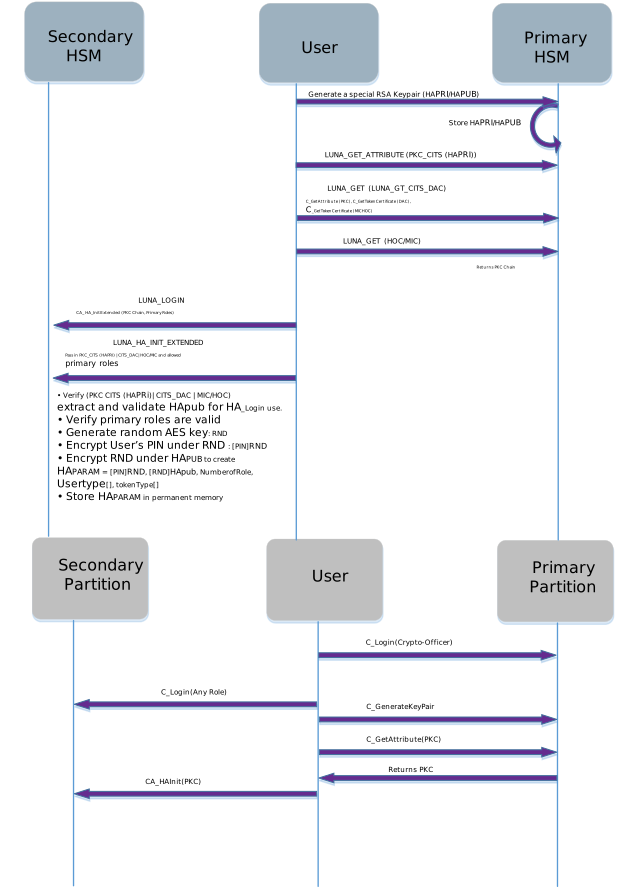
To setup HA Indirect Login between primary partition and a secondary partition the following steps should be followed:
1.Login to the primary partition as the Crypto-Officer.
2.Generate the HA Indirect Login Public/Private key pair.
3.If a secondary should not act as primary, then request a PKC chain for the HA Login Private Key. Otherwise set up the HA Login private on secondary using cloning for V0 partition, or using SKS for V1 partition.
4.Log into the secondary partition as the role you wish to setup for HA Indirect Login.
NOTE As part of the Luna HSM Firmware 7.7.0 (or newer) Indirect Login version, all roles on the HSM can be setup for HA Login on the secondary partition.
If Luna HSM Firmware 7.7.0 (or newer) setup has already been established, then first revoke current HA Login credential and allowed primary roles. All sessions opened on this partition, except the current one, will be implicitly closed.
If HA Indirect Login version 1.1 setup has been done then no need to revoke. All sessions opened on this partition, except current one, will be implicitly closed.
5.If the secondary is not to be permitted to act as primary, then initialize the role on the secondary partition for HA Indirect Login by passing the PKC and allowed primary roles in to the CA_HAInitExtended() API; otherwise the handle of the private login key and allowed primary roles must be passed in. Primary roles, when logged in as primary, are allowed to log in on the secondary as the role currently logged in. It is possible to later update or change the allowed primary roles.
a.Allowed roles are Security Officer, Administrator, Crypto Officer, Crypto User and Limited Crypto Officer.
b.Partition Officer and Auditor do not have access to any key, and therefore are not able to log in using HA Private Key, and thus cannot be valid primary roles.
c.If an allowed role is updated with different roles then any opened session is closed except current one.
Step 5 can be repeated to add additional partitions to the HA Indirect Login group. To act as a primary partition, a partition requires a copy of the HA Login Private Key.
• For V0 partitions this would require cloning the HA Login Private Key to any additional partitions that need to act as a primary partition.
•For V1 partitions it would require SKS extracting the HA Login Private Key from the first partition and inserting to any additional partitions that need to act as a primary partition.
The figure below shows the version 2 HA Indirect Login Setup using the new APIs.
Performing HA Indirect Login Exchange
To perform an HA Indirect Login exchange, the following steps must be performed:
1.Login to the primary partition as a role on the partition that has access to the HA Login Private Key and can act as a primary in an HA Login Exchange.
2.Call CA_HAGetMasterPublicData() on the primary, passing in the handle to the HA Login Private Key and retrieve the Master Public Data (public certificates required by the secondary).
3.Call CA_HAGetLoginChallenge() on the secondary partition, passing in the role ID that is to be authenticated, the Master Public Data from the primary partition (the TWC of the primary and a PKC chain for the HA Login Private Key) and receive the challenge from the secondary partition.
4.Call CA_HAAnswerLoginChallenge() on the primary passing in challenge received from the secondary partition along with the key handle of the HA Login Private Key and receive the challenge response.
5.Call CA_HALogin on the secondary and pass in the challenge response received from the primary partition. Upon success the user is logged in on secondary partition.
HA Indirect Login Public and Private Key Templates
The HSM requires that the HSM Login Private Key and HA Login Public Key have a very restricted set of attribute values to prevent the keys from being abused. Every time the HSM makes use of an HA Login Public/Private Key, it verifies that its attributes match the templates defined below.
HA Login Private Key:
static struct { AttributeId Id; ATTR_VAL ExpVal; UInt32 Size; } attrTbl[] =
{
   // Object
   { CKA_CLASS,               { CKO_PRIVATE_KEY },  sizeof( ClassAttribute ) },

   // StorageClass
   { CKA_TOKEN,               { true },             sizeof( Boolean ) },
   { CKA_PRIVATE,             { true },             sizeof( Boolean ) },
   { CKA_MODIFIABLE,          { false },            sizeof( Boolean ) },

   // Key
   { CKA_KEY_TYPE,            { CKK_RSA },          sizeof( KeyTypeAttribute ) },
   { CKA_DERIVE,              { false },            sizeof( Boolean ) },
   { CKA_LOCAL,               { true },             sizeof( Boolean ) },

   // Private
   { CKA_SENSITIVE,           { true },             sizeof( Boolean ) },
   { CKA_DECRYPT,             { false },            sizeof( Boolean ) },
   { CKA_SIGN,                { false },            sizeof( Boolean ) },
   { CKA_SIGN_RECOVER,        { false },            sizeof( Boolean ) },
   { CKA_UNWRAP,              { false },            sizeof( Boolean ) },
   { CKA_EXTRACTABLE,         { false },            sizeof( Boolean ) },
   { CKA_NEVER_EXTRACTABLE,   { true },             sizeof( Boolean ) }
};
HA Login Public Key:
static struct { AttributeId Id; ATTR_VAL ExpVal; UInt32 Size; } attrTbl[] =
{
   // Object
   { CKA_CLASS,               { CKO_PUBLIC_KEY },   sizeof( ClassAttribute ) },

   // StorageClass
   { CKA_TOKEN,               { true },             sizeof( Boolean ) },
   { CKA_PRIVATE,             { true },             sizeof( Boolean ) },
   { CKA_MODIFIABLE,          { false },            sizeof( Boolean ) },

   // Key
   { CKA_KEY_TYPE,            { CKK_RSA },          sizeof( KeyTypeAttribute ) },
   { CKA_DERIVE,              { false },            sizeof( Boolean ) },

   // Private
   { CKA_ENCRYPT,             { false },            sizeof( Boolean ) },
   { CKA_VERIFY,              { false },            sizeof( Boolean ) },
   { CKA_VERIFY_RECOVER,      { false },            sizeof( Boolean ) },
   { CKA_WRAP,                { false },            sizeof( Boolean ) }
};
Use Cases
The HA Indirect Login feature is typically used in two ways, as follows.
Single Primary HSM with many Secondary HSMs
It is possible to setup a model where a single primary partition is able to HA Indirect Login to one or more secondary partitions. In this model, only the primary partition needs to be in possession of the HA Login Private Key.
This corresponds with the Crypto Command Center (CCC) use case, wherein one HSM acts as a root of trust and is able to HA Indirect Login to the HSM SO role on all other HSMs. This allows CCC to remotely administer the HSM.
Pool of HSMs that can act as the Primary
It is also possible to setup a pool of partitions such that they can all act as the primary in an HA Login exchange, to all other members in the pool. In this setup it is an application monitor the pool of partitions and, if any members goes down (for example, power loss, network outage), any other members that are still online can use the HA Login exchange to restore that member to an authenticated state without any user intervention. This is the original use case for the HA Indirect Login feature.
This model does not require the use of auto-activation in PED-authenticated HSMs, but the challenge secret must still be provided.
To set this up, each partition must have a copy of the HA Login Private Key and the desired role, and each partition must be initialized to use HA Indirect Login.
NOTE The HA Login Private key must have the attribute CKA_NEVER_EXTRACTABLE set to TRUE which means that it must be transferred to the other HSMs using cloning if partition has V0 for Policy 41.
SKS is used for this purpose in V1 partitions. All partitions MUST be in the same cloning domain and the SMK secret should have previously been cloned to them.
Due to an incompatibility with the new cloning regime, when a partition is V0 (because you created it that way, or because a partition already existed when you updated to Luna HSM Firmware 7.7.0 or newer), a Client library contemporaneous with Luna HSM Firmware 7.7.0, or newer, is required if you wish to use the older HA Indirect Login APIs described elsewhere in this document.
NOTE A newly created partition defaults to V0 and assumes the Luna use-case - just as with updated partitions, the purpose is to support older libraries and applications where needed.
Partition Versions and HA Indirect Login Protocol Compatibility
After firmware update to Luna HSM Firmware 7.7.0 (or newer), all pre-existing pre-7.7.0 partitions are updated with Partition policy 41 set to partition version zero (V0).
A V0 partition, as primary, supports HA Indirect Login protocol version 1, version 1.1, and version 2 (the most recent).
A V0 partition, as secondary, supports HA Indirect Login protocol version 1.1 and version 2.
The HA Indirect Login version 2 protocol support on V0 partition allows interested customers to use version 1.1 protocol to access their partition to setup V2 protocol. They can then use V2 protocol, and eventually change policy 41 to convert the partition to V1. This migration can be fully automated.
A V1 partition ( policy 41) as primary supports all versions, but as secondary, supports only version 2 protocol, so prior to converting partitions from V0 to V1, you must perform setup of HA Indirect Login version 2 protocol. Otherwise, you will need to manually login to setup HA Indirect Login version 2 protocol.
API Compatibility for HA Indirect Login Setup
|
Primary |
Secondary |
Library |
version1/version1.1 API For Setup |
version2 API For Setup |
|---|---|---|---|---|
|
Pre-Firmware 7.7 |
Firmware 7.7.0 Partition V0 |
Pre-7.7 |
Supported |
APIs Not Available |
|
Pre-Firmware 7.7 |
Firmware 7.7.0 Partition V0 |
7.7 |
Supported |
Not Supported |
|
Pre-Firmware 7.7 |
Firmware 7.7.0 Partition V1 |
Pre-7.7 |
Not Supported |
APIs Not Available |
|
Pre-Firmware 7.7 |
Firmware 7.7.0 Partition V1 |
7.7 |
Not Supported |
Not Supported |
|
Firmware 7.7.0 V0 |
Firmware 7.7.0 Partition V0 |
Pre-7.7 |
Supported |
APIs Not Available |
|
Firmware 7.7.0 V0 |
Firmware 7.7.0 Partition V0 |
7.7 |
Supported |
Supported |
|
Firmware 7.7.0 V0 |
Firmware 7.7.0 Partition V1 |
Pre-7.7 |
Not Supported |
APIs Not Available |
|
Firmware 7.7.0 V0 |
Firmware 7.7.0 Partition V1 |
7.7 |
Not Supported |
Supported |
|
Firmware 7.7.0 V1 |
Firmware 7.7.0 Partition V0 |
Pre-7.7 |
Supported |
APIs Not Available |
|
Firmware 7.7.0 V1 |
Firmware 7.7.0 Partition V0 |
7.7 |
Supported |
Supported |
|
Firmware 7.7.0 V1 |
Firmware 7.7.0 Partition V1 |
Pre-7.7 |
Not Supported |
APIs Not Available |
|
Firmware 7.7.0 V1 |
Firmware 7.7.0 Partition V1 |
7.7 |
Not Supported |
Supported |
NOTE On a Legacy pre-PPSO Partition (meaning all 5.x firmware HSM partitions as well as all 6.x up to firmware 6.22 and then some post-6.22 partitions, optionally - 7.x HSMs are PPSO-only), when HA Login is setup, the Crypto-Officer or the Crypto-User is required to execute the command to setup HA Login. The role ID of the role that issues the command is stored in the partition so that when the HA Login exchange is performed, the same level of authentication as the role that setup HA Login is restored. The Legacy per-PPSO Partition only maintains one set of state information for HA Login. This means that at any time, the Crypto-Officer or the Crypto-User can re-issue the HA Login setup command to override which role’s authenticate state will be restored by an HA Login exchange.
On a PPSO partition, the Crypto-Officer and Crypto-User have a greater level of separation and as such the PPSO partition maintains HA Login state for both the Crypto-Officer and Crypto-User. However due to a quirk of the PPSO feature, only the Crypto-Officer can be setup for HA Login.
API Compatibility for HA Indirect Login Exchange
|
Primary |
Secondary |
Library |
version1/version1.1 API For HA Login Exchange |
version2 API For HA Login Exchange |
|---|---|---|---|---|
| Firmware 7.7.0 V0 |
Pre-Firmware 7.7.0 |
Pre-Firmware 7.7.0 |
Not Supported |
APIs Not Available |
| Firmware 7.7.0 V0 | Pre-Firmware 7.7.0 | Firmware 7.7.0 (or newer) |
Supported |
Not Supported |
| Firmware 7.7.0 V1 | Pre-Firmware 7.7.0 | Pre-Firmware 7.7.0 |
Not Supported |
APIs Not Available |
| Firmware 7.7.0 V1 | Pre-Firmware 7.7.0 | Firmware 7.7.0 (or newer) |
Supported |
Not Supported |
|
Pre-Firmware 7.7 |
Firmware 7.7.0 Partition V0 |
Pre-Firmware 7.7 |
Supported |
APIs Not Available |
|
Pre-Firmware 7.7 |
Firmware 7.7.0 Partition V0 |
Firmware 7.7 |
Supported |
Not Supported |
|
Pre-Firmware 7.7 |
Firmware 7.7.0 Partition V1 |
Pre-Firmware 7.7 |
Not Supported |
APIs Not Available |
|
Pre-Firmware 7.7 |
Firmware 7.7.0 Partition V1 |
Firmware 7.7 |
Not Supported |
Not Supported |
|
Firmware 7.7.0 V0 |
Firmware 7.7.0 Partition V0 |
Pre-Firmware 7.7 |
Supported |
APIs Not Available |
|
Firmware 7.7V0 |
Firmware 7.7.0 Partition V0 |
Firmware 7.7 |
Supported |
Supported |
|
Firmware 7.7.0 V0 |
Firmware 7.7.0 Partition V1 |
Pre-Firmware 7.7 |
Not Supported |
APIs Not Available |
|
Firmware 7.7.0 V0 |
Firmware 7.7.0 Partition V1 |
Firmware 7.7 |
Not Supported |
Supported |
|
Firmware 7.7.0 V1 |
Firmware 7.7.0 Partition V0 |
Pre-Firmware 7.7 |
Supported |
APIs Not Available |
|
Firmware 7.7.0 V1 |
Firmware 7.7.0 Partition V0 |
Firmware 7.7 |
Supported |
Supported |
|
Firmware 7.7.0 V1 |
Firmware 7.7.0 Partition V1 |
Pre-Firmware 7.7 |
Not Supported |
APIs Not Available |
|
Firmware 7.7.0 V1 |
Firmware 7.7.0 Partition V1 |
Firmware 7.7 |
Not Supported |
Supported |
