|
Home > |
|---|
This page depicts some SafeNet HSM concepts around RBS, and Remote Backup and Restore.
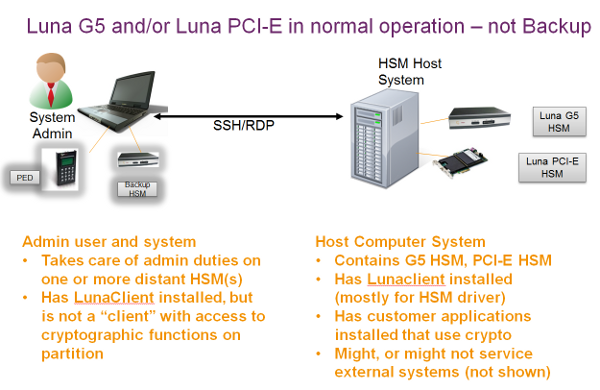
We will depict a sample deployment with SafeNet USB HSM, the HSM that connects to a host computer via USB, and SafeNet PCIe HSM, the HSM that is installed inside a host computer. Our choice is to consider the setup that the majority of customers seem to prefer:
•a host computer with HSM residing in a secure room (server room, or other lock-up with restricted physical access)
and
•an administrative workstation, often a laptop with both Remote PED and Remote Backup HSM equipment, communicating with the primary HSM via SSH or Remote Desktop Protocol sessions.
The HSM in the host takes care of cryptographic operations requested by client applications residing in the host computer.
The admin computer serves the HSM administrator who performs administrative and maintenance duties on behalf of the primary HSM on the host, including authentication for login and activation via Remote PED, and Remote Backup and Restore operations to/from the attached SafeNet Remote Backup HSM.
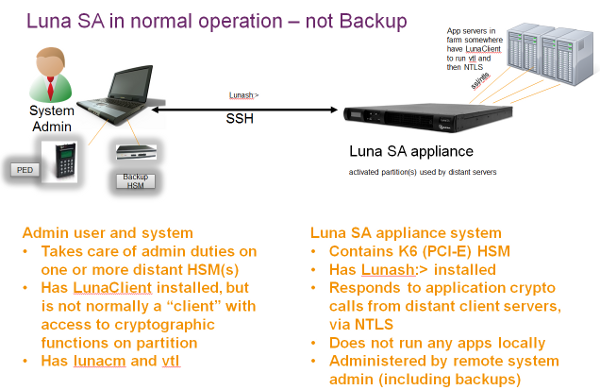
First, a look at the described setup in everyday operation, without considering Backup and Restore.
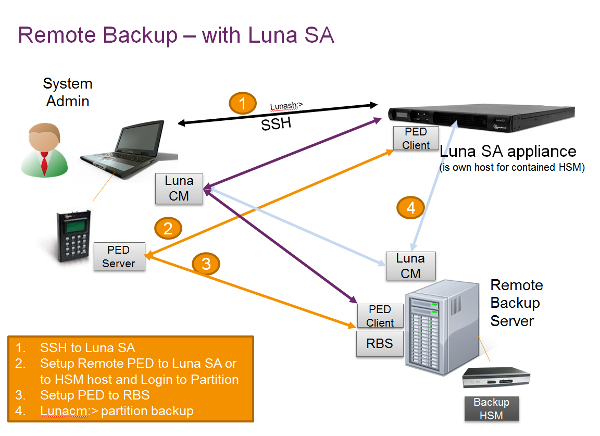
Here is the general case of Remote Backup, with the functions distributed on different computers.
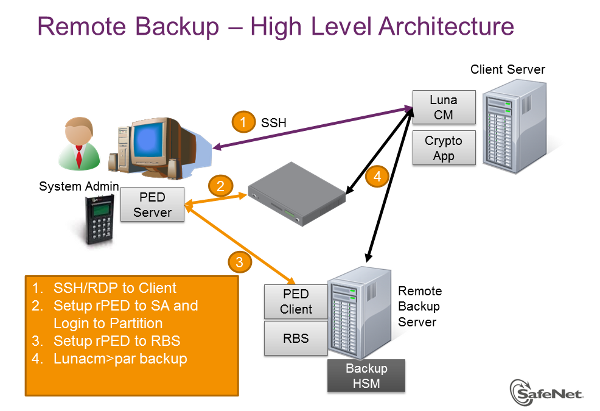
Backup is controlled via the lunacm:> command line. As a system or security administrator, you choose which computer is to run lunacm:> to accomplish the backup/restore operation.
The approach that is chosen comes down to the familiar trade-off between convenience and security.
The lunacm:> utility resides on the HSM's host computer and views the SafeNet Remote Backup HSM as a slot at an IP address (corresponding to an administrator's workstation). The administrator uses an SSH or RDP (Remote Desktop Protocol) session to connect to the primary HSM's host computer and to work that lunacm:> instance where it resides. That is, the administrator is not using lunacm:> on his own computer to run the backup operation. The backup administrator/operator is using lunacm:> on the computer that is directly attached to the primary HSM (the one with the partition being backed-up, such as SafeNet PCIe HSM), or that is a client of a network-attached HSM partition (as in SafeNet Network HSM).
The lunacm:> session on the host computer views its embedded/attached HSMs as local slots. The lunacm:> session can see a distant SafeNet Network HSM as a local slot if the HSM host computer has been made a client of a partition on that SafeNet Network HSM (by a certificate exchange and registration.)
RBS is needed on the Remote Backup computer for this arrangement.
Other than that small difference of perspective, the Remote Backup function works identically for all primary SafeNet HSMs. The drawback to this Remote Backup protocol is that one or more computers, distant from the Backup HSM must be used, as they must be clients of the SafeNet HSM partitions. However, because established clients already have access to their registered partitions, the lunacm:> instance on each client computer can be employed to broker the Remote Backup operation, without exposing the partition access credentials to the operator of the Backup HSM computer. This maintains separation of roles.
The other option for an administrator wanting to backup a distant SafeNet Network HSM partition is to make the computer with the Backup HSM a direct, registered client of the SafeNet Network HSM. Then lunacm:> on that Backup HSM computer can see the distant SafeNet Network HSM as a local slot. This is a local backup operation that does not use RBS, and does not require another computer in the process. The potential drawback is that the Backup HSM computer must have client access to every SafeNet Network HSM partition that it backs up using Local Backup protocol. In some environments, this might be regarded as a security issue.
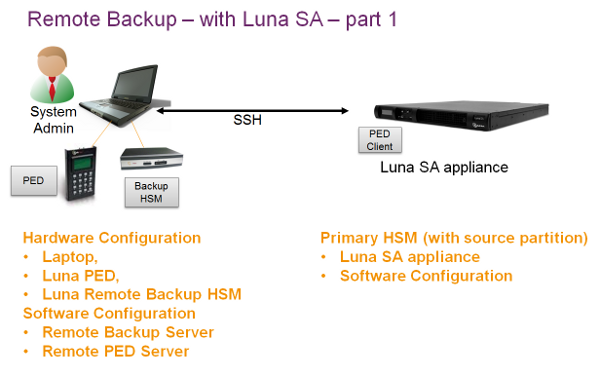
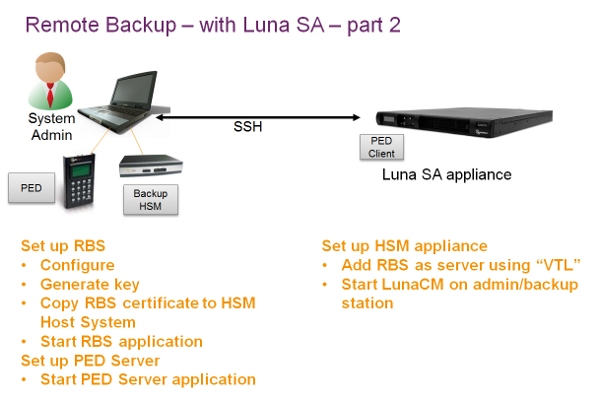
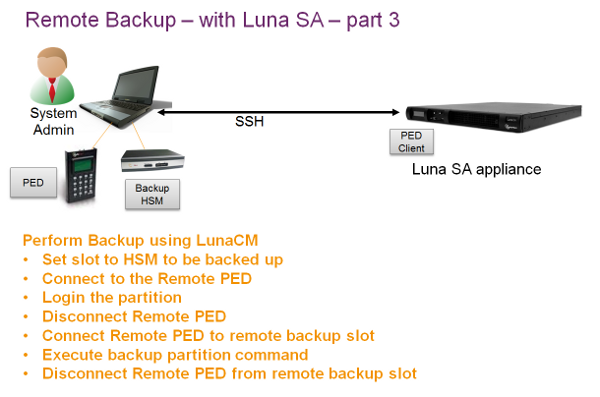
Next, a series depicting the setup and use of Remote Backup and Restore, assisted by Remote PED, where administrator, Remote PED, and Remote Backup are combined at a single laptop/workstation.
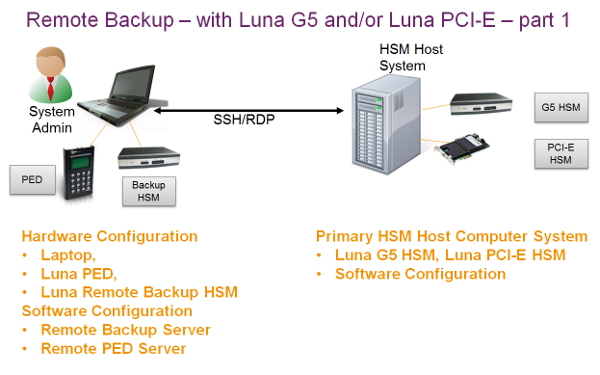
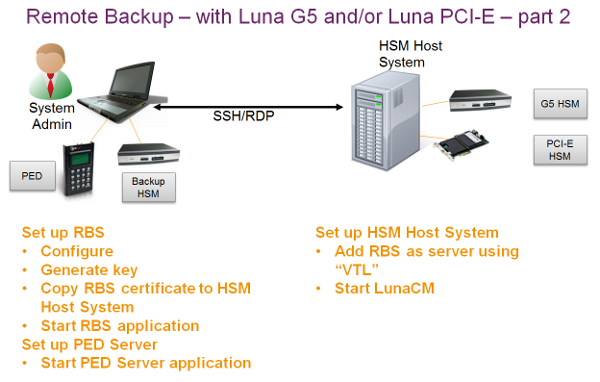
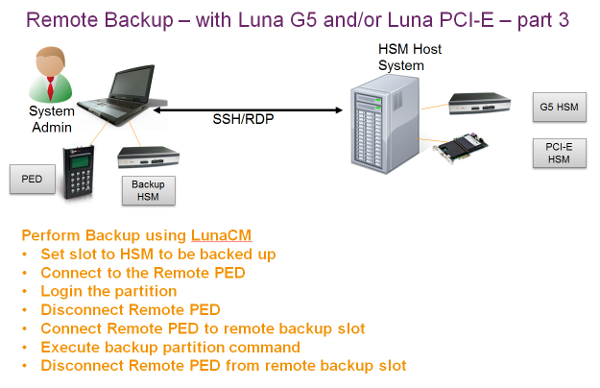
Remote Backup with Remote PED for SafeNet Network HSM, the overview.
SafeNet Network HSM as it would normally operate, serving clients, and being administered via lunash:> over SSH.
Now, a sequence summarizing Remote Backup setup and use.