|
Home > |
|---|
In many cases, it is sound practice to back up the contents of your SafeNet Network HSM, in particular the contents of HSM partitions.
If the important objects are static, then a single backup is sufficient. If important objects change frequently, or if it is important to be able to revert to an identifiable date/time/condition/content, then regular backups are a necessity.
SafeNet HSM 5.x backup is performed with the SafeNet Remote Backup HSM. Note that the word "Remote" in that product name merely denotes a capability. The SafeNet Remote Backup HSM also works fine as the local backup device for SafeNet HSM, and is the only device supported for either local or remote backup of SafeNet Network HSM.
The options for backup of primary/source SafeNet HSMs are:
•Local backup of any SafeNet HSM, where all components are co-located. This is a possible scenario with all SafeNet HSMs, but is more likely with direct-connect, local-to-the-client HSMs such as SafeNet PCIe HSM. It is unlikely for SafeNet Network HSM, simply because SafeNet Network HSM normally resides in a server rack, distant from its administrators.
•Local backup of SafeNet Network HSM, where SafeNet Network HSM is located remotely from a computer that has the SafeNet Backup HSM. This is one of the likely scenarios with SafeNet Network HSM, but requires that the administrator performing backup must have client authentication access to all SafeNet Network HSM partitions.
•Remote backup of any SafeNet HSM, where the SafeNet HSM is located remotely from the computer that has the SafeNet Backup HSM. This scenario requires that the administrator of the SafeNet Backup HSM's host computer must connect (via SSH or RDP) to the clients of each HSM partition that is to be backed up. The client performs the backup (or restore) under remote direction.
In local mode, you connect directly to SafeNet Network HSM via USB. That is, local backup is local to the HSM appliance being backed-up, not necessarily local to the administrator who is directing the process, who might be far away.
For remote backup, you connect (again via USB) to a computer running vtl and the driver for the device. Backup and restore are then performed over the secure network connection. For PED-authenticated SafeNet Network HSM, you must have a copy of the appropriate red (domain) PED Keys, from the SafeNet Network HSM, to use with the Backup HSM, in order to perform the copy /cloning (backup and restore) operation between the HSMs.
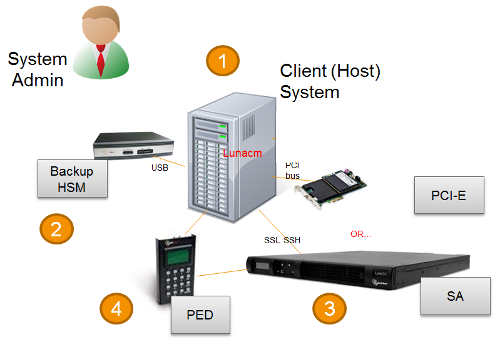
The following diagram depicts the elements and connections of the local backup (and restore) operation, where everything is in one room.
| 1 | Lunacm on Client (Host) System sees the primary and backup slots and controls the backup/restore operation |
|---|---|
| 2 | Backup HSM is a slot visible to "Client (Host) System" when Client (Host) System runs lunacm |
| 3 | Primary HSMs are slots visible to "Client (Host) System" when Client (Host) System runs lunacm |
| 4 | Every slot on the backup must have same domain (red PED Key) as matching slot on the primary HSMs |
For SafeNet Network HSM, the above would be a minority scenario.
The other two backup and restore options:
•Local backup of a distant SafeNet Network HSM
•Remote backup of any SafeNet HSM
... require that PED operations be performed remotely. For that reason, HSMs must be prepared (locally) in advance by having orange Remote PED Keys created and matched with each HSM.
This applies only to SafeNet Network HSM, and is not an option for SafeNet PCIe HSM.
While it is standard to remotely administer SafeNet Network HSM, you can also remotely administer an HSM (SafeNet PCIe HSM embedded in a distant host computer by means of an SSH session or an RDP (Remote Desktop Protocol) session. You could administer several such HSMs from a central location, including performing backup and restore operations with a SafeNet Remote Backup HSM connected to your Admin computer (perhaps a laptop).
For PED authenticated HSMs, this operation requires a PED connection to each primary SafeNet HSM and someone to insert PED Keys and press buttons on the PED keypad, which implies Remote PED and Remote Backup. Once the HSM has been matched to an orange Remote PED Key, all future authentications can be performed with Remote PED, and the HSM can safely be deployed to its distant location.
In the following diagram, the preparation (above) has been done, and suitable orange and red PED Keys have the appropriate secrets imprinted, to allow Remote PED connection and Remote (or local) Backup (cloning) respectively.
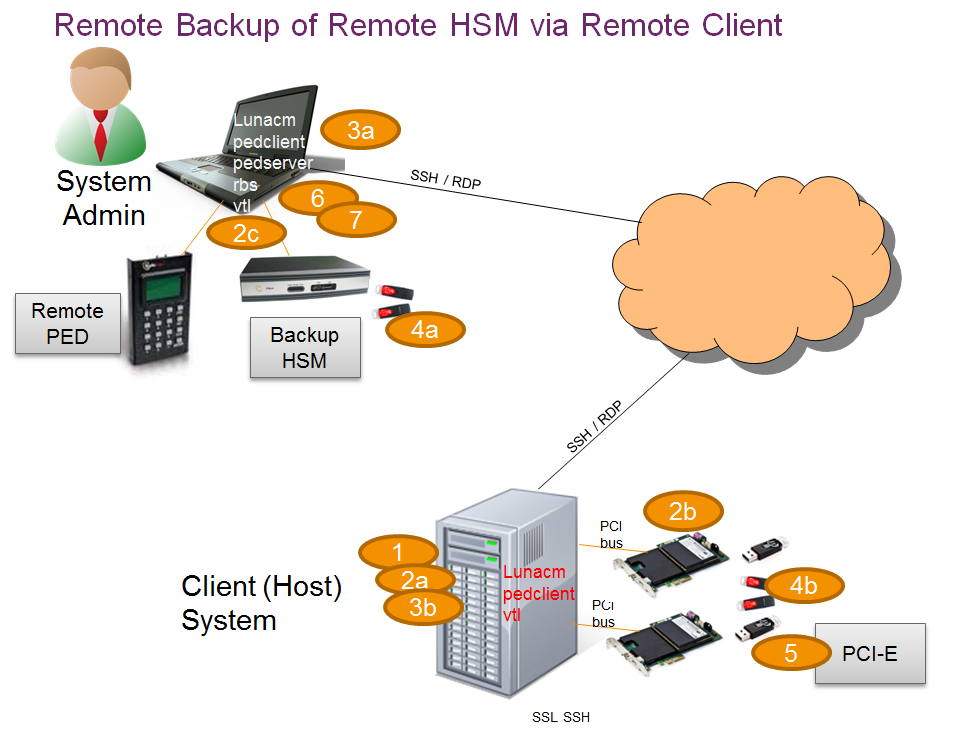
This scenario is applicable to both SafeNet PCIe HSM and SafeNet Enterprise HSMs with slight differences in handling.
| 1 | Lunacm is on both the Client (Host) System and the Admin System, but is run on Client (Host) System to launch and manage the backup and restore activity. |
|---|---|
| 2 | Lunacm on "Client (Host) System" (2a) sees the primary (2b) and backup (2c) slots and controls the backup/restore. |
| 3 |
PedClient is needed on both the Client (Host) System and the Admin System, PedClient is needed on any host that must reach out to a pedserver instance and a Remote PED. PedClient instances can also communicate with each other to facilitate RBS |
| 4 | Every slot on the backup (4a) must have the same domain (red PED Key) as the matching slot on the primary HSMs (4b). |
| 5 | Every primary HSM slot (partition) that is to be backed up or restored must be in login or activated state (black PED Keys -(5)), so that the Client (Host) System can access it with lunacm:> backup or restore commands. |
| 6 | PedServer must reside (and run, waiting for calls) on any computer connected to a Remote PED. |
| 7 | RBS is required on the computer connected to the SafeNet Remote Backup HSM. RBS is not needed on any other computer in the scenario. |
As noted previously, the orange PED Keys [ Remote PED Keys or RPK ] contain a Remote PED Vector (RPV) that matches the RPV inside the SafeNet HSM. It is the presence of that RPV at both ends that allows the connection to be made between the HSM and the Remote PED.